Webtrix Innovations engineers custom mobile applications, SaaS platforms, and enterprise web portals for businesses in Mumbai, Vasai, and across India—connecting intuitive interfaces with robust backend architectures.
User-Focused FlowsConnected Backend LogicBuilt Around Real Requirements
Built with modern Flutter & React Native for butter-smooth 60 FPS transitions. Single codebase deployed to both Apple App Store & Google Play.
60 FPS Fluid Navigation
Offline SQLite Data Caching
Instant Push Alerts & Real-Time Sync
Sub-200ms
Firebase cloud messaging delivering sub-second push notifications for orders, chats, and task alerts. Keeps users engaged with high retention.
Real-time WebSocket Sync
94% Notification Open Rate
Biometric Face ID & Enterprise Cloud
AES-256
Instant biometric security with Apple Face ID, Touch ID & Android Fingerprint. Enterprise backend with auto-scaling databases & 99.99% uptime.
Instant Biometric Login
99.99% Cloud API SLA
< 0.8s Fast Launch
60 FPS Native Motion
Instant Push Alerts
Zero Delivery Latency
BEYOND THE INTERFACE
An App Has a User Side and a System Side.
Users interact with screens, navigation flows and actions. Behind those experiences, an application relies on authentication, data structures, business logic, APIs, device permissions, notifications, and administrative management tools.
A well-engineered application balances user-side simplicity with system-side reliability to keep workflows dependable.
Mobile interfaces designed to work in tandem with an existing web platform, SaaS product, or central database.
Core Capabilities
Platform Companion
API Synchronization
Shared Backend
HOW AN APP CONNECTS
The Interface Is Only One Layer of the Application.
An application operates as a stacked system connecting frontend user touchpoints with client logic, backend APIs, persistent databases, and administrative controls:
LAYER 01
• User Experience
Interface Layer
What users interact with: screens, navigation models, form inputs, list views, and feedback animations.
ArchitectureNode 01/05
LAYER 02
• Client-Side Rules
Application Logic
What drives client behavior: state management, input validation, navigation routing, and offline storage.
ArchitectureNode 02/05
LAYER 03
• Data Orchestration
API / Backend
What processes requests: authentication tokens, business algorithms, external integrations, and webhooks.
ArchitectureNode 03/05
LAYER 04
• Persistent Storage
Database / Services
Where information lives: structured relational records, user credentials, media assets, and event logs.
ArchitectureNode 04/05
LAYER 05
• Business Control
Admin / Management
Where staff oversee operations: user moderation, content updates, request approvals, and configuration.
ArchitectureNode 05/05
APP DEVELOPMENT PACKAGES
Choose the Right App Development Package for Your Business
From focused MVPs to advanced multi-feature business applications, choose a clearly defined package based on your screens, workflows, user roles, backend requirements and growth plans.
Already Have a Website? Convert It to an Android App
Transform your existing responsive website into a native-feel Android app starting at just ₹600 (or $9 USD) (up to ₹1,200 with all standard add-ons). Google Play Store submission via the Webtrix-managed publisher account is included at ₹0 extra fee.
Separate native Android/iOS codebases, multi-sided marketplace ecosystems, complex fintech or healthcare applications can be scoped and architected separately.
Want to explore how the application experience is structured in more detail? Continue below through user journeys, authentication, backend systems, device capabilities and release architecture.
FROM FIRST OPEN TO COMPLETED ACTION
Good Apps Make Complex Workflows Feel Easier.
A purposeful application workflow guides users through six deliberate stages from initial launch to returning engagement:
STAGE 01
Instant Clarity
Open
App launches with an uncluttered initial view and smooth session check.
UX Journey Milestone
STAGE 02
Clear Hierarchy
Understand
Users immediately identify primary actions without confusing introductory bloat.
UX Journey Milestone
STAGE 03
Effortless Discovery
Navigate
Core features remain reachable through intuitive bottom navigation or tab bars.
UX Journey Milestone
STAGE 04
Frictionless Input
Act
Form submissions, requests, and selections are guided by real-time validation.
UX Journey Milestone
STAGE 05
Clear Confirmation
Feedback
Explicit visual indicators confirm successful actions or explain resolution steps.
UX Journey Milestone
STAGE 06
Seamless Continuity
Return
Saved states, order history, and account context remain ready for subsequent visits.
UX Journey Milestone
APP NAVIGATION
Navigation Patterns Should Match Information Structure.
Mobile navigation models are selected based on view depth, frequent task prioritization, and ergonomic thumb reach:
Bottom Navigation Bar
3 to 5 top-level destination areas requiring instant one-thumb access.
Mobile Interaction Pattern
Top Tab Bars
Switching between related sub-views within a single functional screen category.
Mobile Interaction Pattern
Drawer Menus
Secondary account settings, policy documents, and supplemental utility links.
Mobile Interaction Pattern
Contextual Action Bars
Temporary toolbars appearing during item selection, editing, or multi-actions.
Mobile Interaction Pattern
Ergonomic Rule:
Primary workflows are kept in the lower half of the screen ("thumb zone"), avoiding awkward reaches to top corners on modern large-screen phones.
USER ACCESS
Not Every App Needs the Same Login Experience.
Authentication and permission architecture should fit how users interact with your business, supporting secure sessions and multi-role access:
Authentication
Access & Recovery Modes
✓Email & Secure Password authentication
✓Phone number verification / OTP flows where supported
✓Password reset & account recovery workflows
✓Session persistence with secure token refresh
Authorization
Role-Based Access (RBAC)
Customer / End UserScoped
Access personal bookings, place requests, manage saved profile data.
Review team activity, approve exceptions, assign resources and tasks.
System AdministratorScoped
Manage user accounts, configure global settings, audit security logs.
CONNECTED APPLICATIONS
Apps Often Depend on Systems the User Never Sees.
Mobile applications exchange data over secure REST APIs to authenticate accounts, process payments, synchronize records, and trigger push notifications:
Companion management dashboard for staff and administrators
REST API / Webhook Endpoint
Backend Engineering: We engineer structured APIs with token authorization and response caching to keep mobile apps fast on cellular networks.
KEEPING THE EXPERIENCE IN SYNC
The App Needs to Know What Is Happening.
A mature mobile application never leaves users guessing. Every view is built with explicit states for data loading, empty lists, connection drops, and validation errors:
UI STATE
Loading State
Clean skeleton placeholders and spinners while asynchronous data is fetched.
UX Resilience Standard
UI STATE
Empty State
Helpful illustration and primary call-to-action when no records yet exist.
UX Resilience Standard
UI STATE
Success State
Unambiguous visual confirmation that a booking, purchase, or update succeeded.
UX Resilience Standard
UI STATE
Error State
Clear explanation of what went wrong with an actionable retry button.
UX Resilience Standard
UI STATE
Offline State
Non-intrusive banner indicating disconnected status while serving cached data.
UX Resilience Standard
UI STATE
Pending State
Clear status indicators for asynchronous actions awaiting server approval.
UX Resilience Standard
RELEVANT COMMUNICATION
Notifications Should Support the Experience, Not Interrupt It.
Push notifications and transactional alerts should deliver timely, relevant context that helps users complete workflows without intrusive messaging:
Order & Request Status
Real-time updates when an inquiry, order, or service request moves to the next stage.
Contextual Trigger
Booking Reminders
Contextual alerts reminding clients of upcoming scheduled appointments or deadlines.
Contextual Trigger
Account Security Alerts
Immediate notices for new logins, password changes, or profile credential updates.
Contextual Trigger
Transactional Confirmations
Instant receipts and confirmation notices following successful payments or submissions.
Contextual Trigger
Operational Team Alerts
Staff notifications when new customer requests require assignment or approval.
Contextual Trigger
System & Policy Notices
Essential announcements regarding scheduled maintenance or platform updates.
Contextual Trigger
Notification Policy:
Notification pipelines are integrated with platform services (FCM / APNs) and configured so users can customize their notification preferences within their app profile.
WHEN THE APP NEEDS THE DEVICE
Mobile Applications Can Use Device Capabilities Where Workflows Require Them.
Native hardware features should only be requested when they directly serve a specific user task, with transparent explanations and graceful fallback options:
Camera & Capture
Photo uploads for profile avatars, issue verification, or document capture.
Hardware API Integration
File Storage & Picker
Selecting and attaching PDF documents, spreadsheets, or images.
Hardware API Integration
Geolocation & GPS
Locating nearby service centers, address verification, or delivery tracking.
Hardware API Integration
Push Notifications
Direct platform-delivered alerts for critical user journey updates.
Hardware API Integration
Microphone & Audio
Voice input or audio recording where included in project requirements.
Hardware API Integration
Biometric Authentication
Fast local authentication using fingerprint or facial recognition.
Hardware API Integration
QR & Barcode Scanning
Instant code scanning for event tickets, asset tags, or promo codes.
Hardware API Integration
Contact Access
Selecting phone contacts when sharing invites where user explicitly permits.
Hardware API Integration
Permission ProtocolTransparent UX Lifecycle
Step 01
Feature Invocation
User triggers a specific action requiring hardware access (e.g. upload photo).
Step 02
Contextual Explanation
App displays a friendly pre-permission prompt explaining why access is needed.
Step 03
System Permission Dialog
Native OS permission prompt is presented to the user.
Step 04
Dual State Handling
Code cleanly handles both Granted and Denied permission outcomes.
Step 05
Fallback Graceful Flow
If denied, app provides alternative manual options or settings guidance.
BEHIND THE APP
Many Applications Also Need a Business-Side Interface.
While end users interact with the mobile app, your internal team needs a web-based administration panel to review user accounts, process requests, broadcast alerts, and audit data:
Customer App
Mobile Interface (iOS / Android)
REST API & Backend
Shared Database & Logic
Admin Portal
Web Management Dashboard
User Account Management
View registered app accounts, manage role permissions, and handle password resets.
Admin Tooling
Request & Workflow Processing
Review incoming user submissions, assign team members, and update progress states.
Admin Tooling
Content & App Configuration
Update banner content, FAQs, service catalogs, and operational business hours.
Admin Tooling
Notification Broadcasts
Send targeted transactional or informational alerts to specific user segments.
Admin Tooling
Audit Trails & System Logs
Maintain historical records of transactions, status changes, and administrative actions.
Admin Tooling
THE RIGHT APPLICATION APPROACH
Platform and Technology Should Follow the Requirement.
Technology choices depend on whether your application requires native device hardware, cross-platform distribution, or lightweight browser access:
ENGINEERED
Cross-Platform App (Flutter)
Projects needing a single shared codebase deployed across both Android and iOS devices.
Key Advantages
Unified codebase for mobile platforms
Fast rendering performance
Consistent UI experience
ENGINEERED
Responsive Web App / PWA
Application requirements accessible immediately in browsers without app store distribution.
Key Advantages
Zero app store friction
Universal browser reach
Lower initial maintenance overhead
ENGINEERED
Custom Backend & APIs (Laravel)
Robust server-side application logic, database orchestration, and multi-interface API hubs.
Key Advantages
High maintainability
Secure tokenized authentication
Flexible database modeling
Decision Framework
Choosing Between a Dedicated Mobile App vs a Web Application
A Mobile App May Be Relevant When:
Native device hardware integration is essential (Camera, GPS, Biometrics)
Users access the tool frequently throughout the day on mobile
Push notification communication is central to the workflow
Distribution via official App Store / Google Play is desired
A Web App / PWA May Be Relevant When:
Universal access across laptops, tablets, and phones without installation
Immediate access via URL link without app store review steps
Lower maintenance overhead across varying mobile operating systems
Workflows primarily centered on forms, dashboards, and reporting
We help you choose the delivery format around your actual users and operational goals—rather than defaulting to an unnecessary platform.
FROM REQUIREMENT TO APPLICATION
Start With the Workflow Before Choosing the Technology.
We follow a rigorous seven-stage engineering lifecycle to ensure your application is built around validated user journeys and reliable backend systems:
STAGE 01
01
Discovery & Requirements
Defining target users, functional workflows, data requirements, and platform distribution goals.
Milestone Verified
STAGE 02
02
User Flows & Wireframing
Mapping end-to-end user journeys, screen sequences, and interaction hierarchy before visual styling.
Milestone Verified
STAGE 03
03
UI/UX Interface Design
Crafting high-fidelity mobile screens, navigation components, and state screens adhering to design guidelines.
Milestone Verified
STAGE 04
04
Architecture & API Planning
Designing data schemas, authentication endpoints, REST APIs, and backend business logic.
Milestone Verified
STAGE 05
05
Application Engineering
Developing the frontend application and backend API services according to technical specifications.
Milestone Verified
STAGE 06
06
Workflow & Quality Testing
Testing user flows, validation rules, error recovery, device scaling, and API synchronizations.
Milestone Verified
STAGE 07
07
Release & Ongoing Support
Preparing application build assets, metadata, deployment configurations, and post-release support.
Milestone Verified
DESIGNED FOR REAL DEVICES
An App Needs to Work Across More Than One Screen Size.
Mobile hardware varies widely in screen aspect ratio, display pixel density, and camera notches. We engineer responsive UI containers that adapt cleanly across hardware form factors:
Screen Scale Adaptation
Fluid layouts adapting smoothly across compact 360px phones up to large displays.
Viewport Adaptability
Safe Area & Notch Insets
Intentional padding respecting hardware camera cutouts and home gesture bars.
Viewport Adaptability
Keyboard Awareness
Viewports shifting smoothly when virtual keyboards open so form inputs remain visible.
Viewport Adaptability
Thumb-Zone Targets
Buttons and interactive controls positioned within natural one-handed reach zones.
Viewport Adaptability
Dynamic Type Scaling
Text containers engineered to accommodate accessibility font size preferences.
Viewport Adaptability
Device Orientation Logic
Configured portrait and landscape locking or adaptive layout orientation rules.
Viewport Adaptability
WHEN THE NETWORK CHANGES
Mobile Connectivity Is Not Always Constant.
Cellular networks drop in basements, elevators, and transit. Applications must be built to handle timeouts gracefully, cache data locally, and queue pending submissions:
Graceful Timeout Handling
Meaningful feedback rather than frozen screens when requests take longer on slow cellular connections.
Network Resilience
Cached Offline Data
Displaying previously loaded records locally so users can review data without active network access.
Network Resilience
Visual Connection Banners
Subtle indicators alerting users when network drops, without blocking local interface navigation.
Network Resilience
Queued Action States
Holding local drafts or pending submissions until network connectivity is re-established.
Network Resilience
Automatic Retry Logic
Intelligent exponential backoff retries for transient network failures.
Network Resilience
Asset & Payload Optimization
Compressing API payloads and image assets to minimize cellular data consumption.
Network Resilience
Data Architecture:
Offline behavior depends on the specific functional requirements of the app. Critical read-only data can be cached locally while transactional actions require verified server confirmation.
SECURITY CONSIDERATIONS
Application Security Is a Shared Technical Responsibility.
We implement tokenized session management, encrypted API transit, server-side data sanitization, and strict role validation to safeguard user information:
SAFEGUARD 01
Encrypted API Communication
All network requests transmitted strictly over TLS/HTTPS with certificate validation.
Security Protocol
SAFEGUARD 02
Secure Token Storage
Authentication tokens stored using encrypted platform storage primitives.
Security Protocol
SAFEGUARD 03
Role-Based Endpoint Guards
Strict server-side validation ensuring users only access permitted backend resources.
Security Protocol
SAFEGUARD 04
Server-Side Input Sanitization
Thorough backend validation preventing injection attacks and malformed payloads.
Security Protocol
SAFEGUARD 05
Session Timeouts & Expirations
Configured token expiration lifecycles and secure session revocation tools.
Security Protocol
SAFEGUARD 06
Environment Secret Isolation
Private API keys and signing credentials stored securely outside client codebases.
Security Protocol
Responsible Security Stance:
No internet-connected application can responsibly be claimed as completely immune to risk. We apply established framework safeguards and follow platform storage best practices to minimize vulnerabilities.
BEFORE RELEASE
An App Needs to Be Tested as a Workflow, Not Just Screen by Screen.
Quality assurance spans user transitions, permission states, network interrupts, form validation, and backend synchronizations:
TEST 01
Navigation & Route Integrity
Verifying all screen transitions, back-button handling, and deep links function smoothly.
Workflow Verification
TEST 02
Input Validation & Error Cues
Ensuring forms reject malformed inputs with clear, helpful guidance messages.
Workflow Verification
TEST 03
All 6 UI States Validated
Testing Loading, Empty, Success, Error, Offline, and Pending states across all core views.
Workflow Verification
TEST 04
Role-Based Access Verification
Confirming user roles only view authorized screens and operational actions.
Workflow Verification
TEST 05
API & State Synchronization
Validating that client views update immediately after backend data changes.
Workflow Verification
TEST 06
Cross-Device Responsiveness
Testing interface integrity across varying screen densities, aspect ratios, and safe areas.
Workflow Verification
TEST 07
Permission Edge Cases
Checking application behavior when device permissions are granted or denied.
Workflow Verification
TEST 08
Notification Delivery Flow
Testing trigger-to-device delivery, tapping actions, and deep-link routing.
Workflow Verification
FROM DEVELOPMENT TO USERS
Releasing an App Includes More Than Uploading a File.
Publishing to official stores or internal enterprise channels requires cryptographically signed builds, privacy declarations, screenshot assets, and store compliance:
Store Metadata & Asset Prep
Compiling app icons, feature screenshots, promotional graphics, and descriptive copy.
Release Milestone
Privacy Policies & Declarations
Preparing mandatory privacy documentation detailing data collection and permissions.
Release Milestone
Application Signing & Builds
Generating cryptographically signed release builds and distribution archives.
Release Milestone
Platform Policy Compliance
Structuring applications to adhere to official Apple App Store and Google Play guidelines.
Release Milestone
Internal / Enterprise Distribution
Configuring private distribution channels for internal workforce tools.
Release Milestone
Web App / PWA Deployment
Deploying browser-accessible progressive web applications with automated hosting pipelines.
Release Milestone
Store Approval Governance:
We structure apps to adhere strictly to Apple App Store and Google Play guidelines. Final publication approval is controlled by the respective platform operators according to their current review standards.
LIVE PRODUCTION CASE STUDY
From Broken AI Prototype to Dual Google Play Store Apps
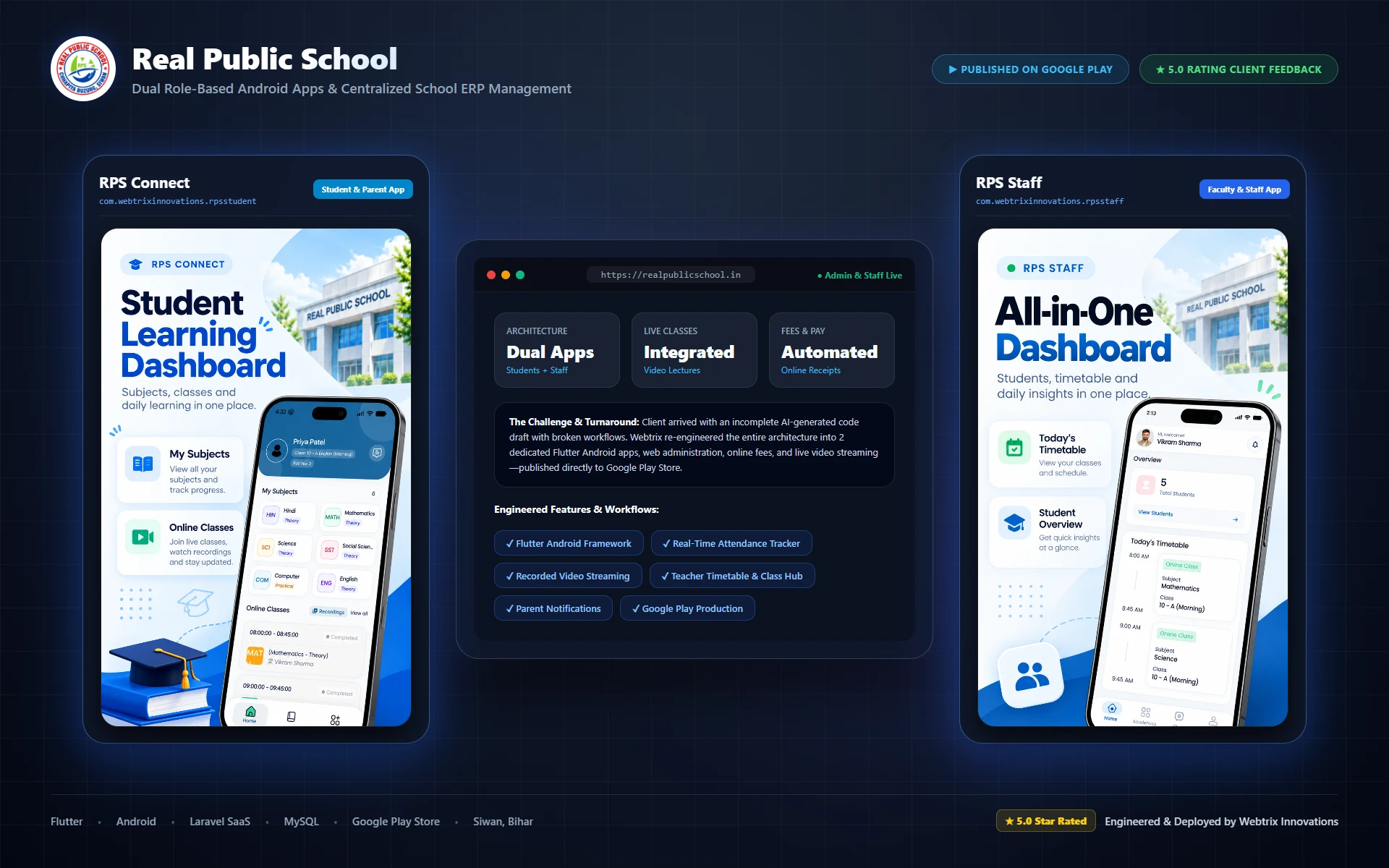
When Real Public School approached us with an incomplete, broken AI-generated app, Webtrix Innovations re-architected the entire digital system into two dedicated native Android applications published live on Google Play, backed by a unified school ERP web portal.
realpublicschool.in
Dual Play Store Apps Live
Flutter • Laravel • Google Play100% Store Approved
5.0 Verified Review
Google Review
“The school management app is work properly without any issue. Webtrix Innovations designed and delivered both our student and staff mobile applications for Google Play Store along with our school ERP portal, covering live classes, video streaming and fee management smoothly.”
Real Public School ManagementSiwan, Bihar
Production Architecture
Real Public School Educational Ecosystem
Instead of forcing teachers, students, and drivers into one congested application, we architected two separate role-tailored mobile applications and synchronized them with a central administration dashboard.
01
RPS Connect (Student & Parent App)
com.webtrixinnovations.rpsstudent
Live online classes, on-demand recorded video lectures, automated timetable, exam schedules, digital fee receipt downloads, and push notifications for urgent school announcements.
02
RPS Staff (Faculty & Operations App)
com.webtrixinnovations.rpsstaff
Teacher attendance marking, marks submission, lesson planning, student performance tracking, driver transportation updates, and staff leave approvals.
03
Central School ERP SaaS Web Portal
realpublicschool.in
Unified Laravel administrative portal for school management: admission pipelines, fee collection accounting, automated report card generation, payroll, and content upload.
Applications Usually Change as Requirements Change.
Mobile operating systems release annual updates, backend APIs evolve, and user feedback drives new features. Ongoing support keeps your software stable and compatible:
OS & Platform Compatibility
Updating application dependencies as annual iOS and Android operating system versions evolve.
Ongoing Evolution
Bug Fixes & Patch Management
Resolving edge-case errors, memory leaks, and third-party dependency deprecations.
Ongoing Evolution
Feature Iterations & Enhancements
Expanding user workflows, adding new modules, and refining interface interactions.
Ongoing Evolution
API & Backend Synchronization
Maintaining seamless compatibility between evolving server APIs and installed client apps.
Ongoing Evolution
Security Patches & Dependency Care
Regularly auditing and updating underlying libraries to address security advisories.
Ongoing Evolution
Operational Performance Review
Reviewing error logs and server response times to maintain consistent application speed.
Ongoing Evolution
WHO APP DEVELOPMENT CAN SUPPORT
Apps Can Serve Customers, Teams or Business Workflows.
Whether launching client-facing self-service apps, digitizing manual paperwork, or equipping mobile technicians, our engineering adapts to your use case:
Use Case
Service Businesses
Need streamlined booking, scheduling, and direct client communication.
Application Focus
Customer appointment scheduling, service status, and push alerts.
Use Case
Businesses With Repeat Activity
Need dedicated mobile experiences for frequent returning users.
Application Focus
Fast authenticated access, saved preferences, and account history.
Use Case
Internal Operations Teams
Need mobile-friendly tools for field staff, technicians, or warehouse teams.
Application Focus
Data capture, task management, photo uploads, and offline resilience.
Use Case
Commerce & Retail Brands
Need dedicated in-app ordering and loyalty experiences.
Application Focus
Product discovery, quick reordering, and integrated mobile payments.
Use Case
Digital Platforms & SaaS
Need companion mobile interfaces for web platforms and software tools.
Application Focus
API synchronization, real-time telemetry, and mobile notifications.
Use Case
Modernizing Manual Processes
Converting paper-based or spreadsheet tasks into structured apps.
Application Focus
Input forms, automated validation, and central database logging.
PROJECT SCOPE
What an App Development Engagement May Include.
Scope items and technical milestones are outlined clearly in your formal proposal based on the agreed functional requirements:
User authentication & session management architecture
Structured per agreed scope
7
Role-based permission & access control logic
Structured per agreed scope
8
REST API endpoints & backend data processing
Structured per agreed scope
9
Database schema modeling & database migrations
Structured per agreed scope
10
Push notification & transactional alert setup
Structured per agreed scope
11
Device hardware integration (Camera, GPS, Files)
Structured per agreed scope
12
Administrative companion dashboard for business management
Structured per agreed scope
13
Third-party software & service API integrations
Structured per agreed scope
14
Comprehensive workflow testing & error simulation
Structured per agreed scope
15
Signed application build files & release archives
Structured per agreed scope
16
App Store / Play Store metadata & screenshot preparation
Structured per agreed scope
17
Technical handoff documentation & source code
Structured per agreed scope
18
Post-release maintenance & support options
Structured per agreed scope
Custom Scope: Deliverables are customized to your platform target (Flutter, Web PWA, Custom Backend) and outlined prior to project kickoff.
BEFORE WE BUILD
A Clear Workflow Is More Useful Than a Long Feature List.
You do not need a complete technical blueprint before contacting us. Having thoughts on these questions helps streamline our initial architecture planning:
Overview of your business, services, and commercial goals for the app
Target audience description and primary user personas
Core actions users need to accomplish within the application
List of desired screens, views, or primary modules
Existing website, database, or backend API details (if available)
User role definitions and access permissions required
Notification requirements and preferred communication channels
Brand assets (logo files, color guidelines, typography preferences)
Target deployment preferences (App Store, Google Play, Internal distribution, Web)
Third-party service accounts (payment gateway, SMS provider, analytics)
Early Stage Project?
Have the Idea but Not the Technical Specification?
That is completely fine. Start by explaining who will use the application, what they need to accomplish, and what your team needs to manage. The technical architecture can follow from those requirements.
Answers to common questions regarding cross-platform app development, backend APIs, app store releases, and maintenance.
App development is the process of planning, designing, and building application experiences around specific users, workflows, and business functionality. Depending on the project, it also involves backend systems, APIs, authentication, notifications, and administrative management tools.
Cross-platform development (such as Flutter) may be suitable for projects that need to target both Android and iOS from a unified codebase. The appropriate technical approach depends on your required functionality, platform requirements, and project scope.
Not always. Some requirements are served effectively by a responsive website or web application, while others benefit from a dedicated mobile app that leverages device hardware, frequent mobile use, or push notifications. The choice should be based on your users and workflows.
Many applications require a backend server or API for authentication, data persistence, business logic, and integrations. The exact backend architecture depends on what the application needs to accomplish.
Yes. A companion administration interface can be developed when the business needs to manage user accounts, review customer requests, update content, broadcast notifications, and audit application data.
Push notifications and transactional alerts can be integrated when they support the application workflow and the required platform notification infrastructure is configured.
Relevant native device capabilities (such as camera capture, GPS geolocation, file access, and biometrics) can be integrated when the application workflow requires them and the user grants platform permission.
Eligible Android apps can be submitted to Google Play through the Webtrix-managed publisher account without a separate Google Play publisher-account charge to the client. If you require publication through your own Google Play Console account or the Apple Developer Program ($99/year), the applicable provider account fees remain your responsibility. All submissions remain subject to platform policies, review and approval.
Ongoing technical support, operating system compatibility updates, bug fixes, and feature enhancements can be provided through agreed post-release support agreements.
Yes. Webtrix Innovations offers a dedicated standalone Website to Android App Conversion service starting at ₹600 (up to ₹1,200 standard with optional Push Notifications, AdMob, and Advanced WebView device features). This packages your existing live, mobile-responsive HTTPS website into a native Android app wrapper (.aab/APK) and includes Google Play Store submission via the Webtrix-managed publisher account at ₹0 extra publisher fee (subject to Google policies & approval).
Website to Android App conversion (₹600–₹1,200) creates a lightweight native Android wrapper for an existing live website with branded app icon, splash screen, and optional webview enhancements. Custom App Development packages (from ₹1,50,000+), by contrast, entail full custom cross-platform/native frontend engineering in Flutter/React Native, custom database architecture, dedicated REST API backends, multi-role user dashboards, and custom offline workflows built from scratch.
Webtrix Innovations develops mobile apps (Flutter, Android, iOS) and web applications for businesses in Mumbai, Vasai, Virar, and the Mumbai Metropolitan Region (MMR), while partnering with startups and enterprises remotely across India.
A complete education management ecosystem engineered for Real Public School. Re-architected from an incomplete AI draft into two dedicated Android apps published on Google Play Store (RPS Connect for students & parents; RPS Staff for faculty), backed by a centralized web portal with live classes, video lecture streaming, automated fee payments, and attendance tracking.
Scope: Flutter App Development, Android Apps, Live Classes & Video Streaming, Fee Management & Payment Gateway, School ERP SaaS Backend, Google Play Store Publishing.
You do not need to arrive with a framework choice or complete technical specification. Explain the users, workflow and business requirement first—the application architecture can follow from there.