Why Is Your Business Website Not Generating Leads? 15 Reasons & Fixes (2026)
Website getting traffic but no enquiries? Discover 15 reasons your business website isn't generating leads, with practical fixes and an audit checklist.

Your business has a website. The design looks professional, your services are listed, and people may even be visiting your pages.
But there is one frustrating problem: your website is not generating enough enquiries, phone calls, WhatsApp messages, or qualified leads.
For many small businesses in India, having a website is only the beginning. A website must also help potential customers understand your services, trust your business, and take the next step.
The problem may not be the website's appearance. It could be poor search visibility, irrelevant traffic, unclear messaging, slow loading, weak calls to action, broken enquiry forms, or missed follow-ups.
This guide explains 15 common reasons a business website fails to generate leads in 2026, how to identify each problem, and what you can do to improve results.
Key Takeaways: Why Websites Fail to Generate Leads (2026 Diagnostic Summary)
- Traffic Relevance > Raw Volume: Relevant commercial traffic can be more valuable than a larger volume of unrelated visits.
- Clarity Beats Cleverness: Visitors should be able to understand your main offer quickly.
- Mobile Usability Is Non-Negotiable: Mobile usability is essential because customers may discover and contact businesses using smartphones.
- Eliminate Contact Journey Friction: Test every phone link, WhatsApp CTA, and form field on real smartphones to ensure enquiries reach your inbox.
- Measure Confirmed Leads, Not Just Clicks: Distinguish button taps from confirmed customer conversations using GA4
generate_leadevents. - Speed Up Follow-Up: A high-converting website cannot compensate for delayed responses; qualify and reply to enquiries promptly.
Quick Answer: Why Is My Website Not Generating Leads?
A business website may not generate leads because it attracts too few relevant visitors, fails to communicate a clear offer, lacks visible calls to action, provides a poor mobile experience, or creates friction during the enquiry process.
Technical problems, weak trust signals, incorrect analytics tracking, and slow responses to enquiries can also contribute.
The best solution is to identify where potential customers are dropping out of the journey before investing in more traffic, advertising, or a complete website redesign.
Website Traffic vs Website Leads: What's the Difference?
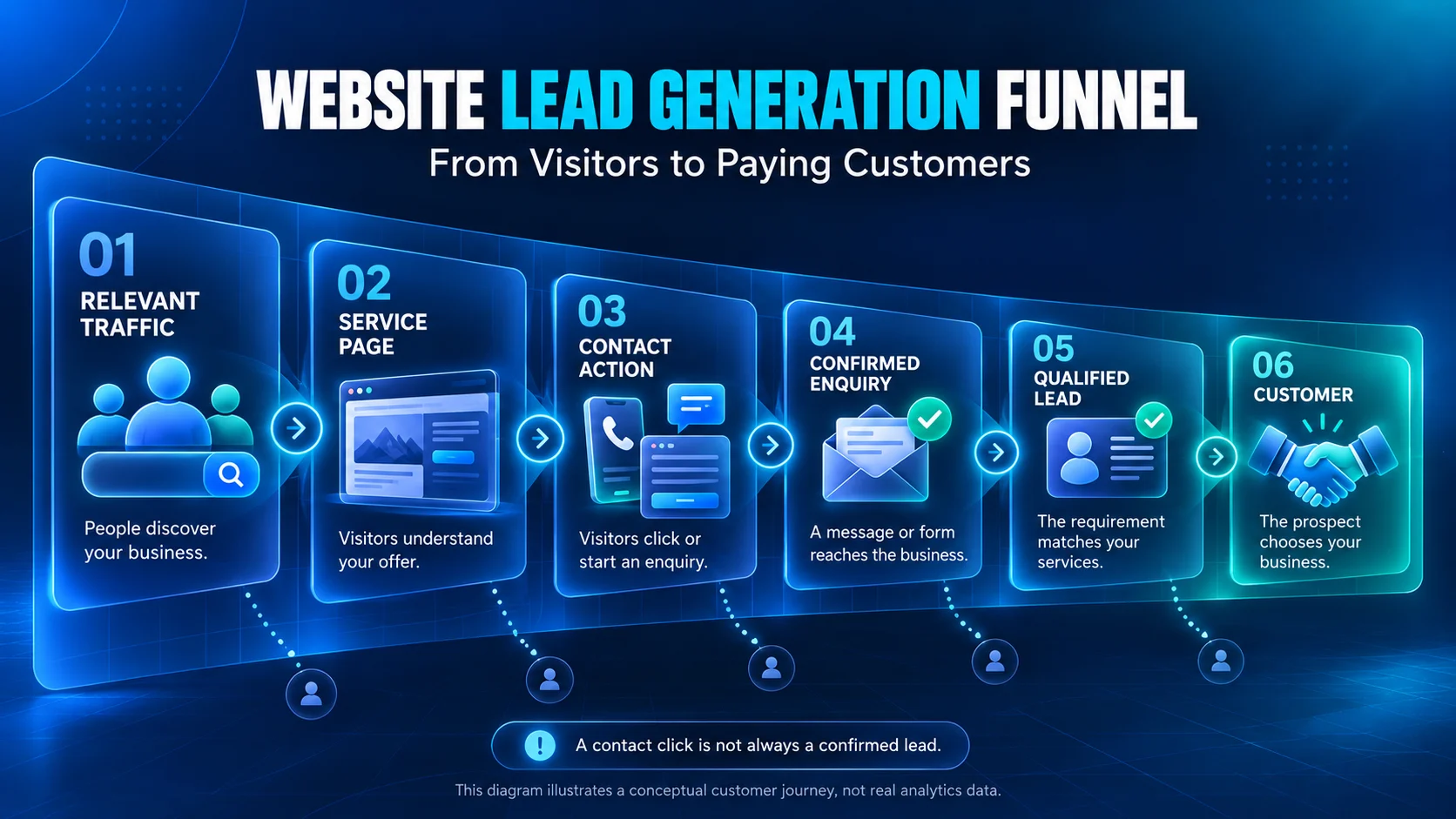
Website traffic refers to visits to your website. A lead is a potential customer who expresses interest in your business, usually by submitting an enquiry, calling, requesting a quotation, or starting a relevant conversation.
However, not every click or message is automatically a qualified lead.
For example:
- Website visitor: Someone reads your service page.
- Contact action: Someone clicks your WhatsApp or phone button.
- Lead: Someone successfully contacts your business about a service.
- Qualified lead: Someone has a genuine requirement that fits your services.
- Customer: Someone accepts your proposal or purchases your service.
A website can receive visitors without generating leads. It can also generate enquiries that never turn into customers.
Understanding this difference is essential before diagnosing the problem.
How to Identify Why Your Website Is Not Getting Enquiries
Before changing your website design, examine the customer journey.
| What you notice | Possible problem | What to investigate |
|---|---|---|
| Very few Google impressions | Limited search visibility | Indexing, content and keyword targeting |
| Impressions but few clicks | Search-result relevance | Page titles, descriptions and search intent |
| Visitors but almost no contact actions | Website conversion problem | Messaging, CTA, trust and UX |
| Contact clicks but no enquiries | Contact journey friction | WhatsApp links, phone links and forms |
| Form starts but few completions | Form usability problem | Required fields, errors and mobile UX |
| Enquiries but few customers | Lead quality or sales problem | Qualification, pricing and follow-up |
Use Google Search Console to understand organic search visibility and Google Analytics to examine website interactions.
These tools answer different questions. Search Console focuses on how people discover your website through Google Search, while Google Analytics measures interactions after visitors arrive.
Now let's examine the 15 reasons.
15 Reasons Your Business Website Is Not Generating Leads
1. Your Website Is Not Attracting Enough Relevant Traffic
One of the simplest reasons for low enquiry volume is that your website does not receive enough visits from potential customers.
A website cannot consistently generate enquiries if the people who need your services cannot find it.
However, traffic quantity alone is not the answer. A hundred relevant visitors may be more valuable to your business than thousands of visitors who are not interested in your services.
Common warning signs:
- Important service pages receive very few search impressions.
- Your business is difficult to find for relevant service searches.
- Most traffic comes from unrelated topics.
- Your website has little content answering customer questions.
How to fix it:
- Identify the main services customers search for.
- Create dedicated, helpful pages for important services.
- Target relevant commercial and informational search intent.
- Improve internal links between related pages.
- Review whether your important pages are indexable.
- Build useful content around real customer problems.
Example: A website development agency targeting Mumbai should explain its website services, target customers, project process, and service availability rather than relying only on a generic homepage.
What to measure: Search impressions, organic clicks, landing-page sessions, and qualified leads from relevant pages.
If your main problem is traffic rather than conversions, start with SEO optimization before making major conversion-focused changes.
2. Your Website Attracts Visitors With the Wrong Search Intent
Not every person searching online is ready to buy.
Someone searching for "how to build a website for free" may be looking for a tutorial. Someone searching for "business website development company in Mumbai" may be evaluating a professional service.
Both people may visit a web development website, but their intentions are different.
Why this affects leads: If your pages attract visitors who only want free information, your traffic may increase without producing relevant sales enquiries.
How to fix it:
- Separate educational content from service-focused content.
- Match each page to the question or requirement behind the search.
- Link useful blog articles to relevant service pages.
- Explain who your services are suitable for.
- Avoid targeting unrelated high-volume keywords simply to increase visits.
For example, an article explaining website costs can naturally guide interested readers towards requesting a project estimate.
If you're planning a new website, read our Website Development Cost in India 2026 guide.
What to measure: Landing-page quality, relevant enquiries, and qualified lead rate—not only visitor numbers.
3. Your Homepage Does Not Clearly Explain What You Offer
Imagine visiting a website that says:
"Transforming Digital Experiences Through Innovation."
It sounds impressive, but what does the business actually do?
Does it build websites? Develop mobile apps? Offer SEO? Sell software?
Visitors should not need to investigate several pages to understand your main offer.
How to fix it:
Your homepage should answer four questions quickly:
- What does your business offer?
- Who is the service for?
- Why should customers consider you?
- What should visitors do next?
Example of a clearer headline:
"Website Design & Development for Businesses in Mumbai"
Supporting text:
"Responsive business websites, e-commerce stores, and custom web solutions built around your project requirements."
CTA:
"Discuss Your Website Project"
Specific messaging helps visitors decide whether your business matches their needs.
What to measure: Homepage engagement, primary CTA clicks, service-page visits, and enquiries originating from the homepage.
4. Your Website Has Weak or Confusing Calls to Action
A call to action, or CTA, guides a visitor towards the next step.
Examples include:
- Request a Quote
- Book a Consultation
- Get a Free Website Audit
- Call Our Team
- Discuss Your Project
A website may contain useful information but still struggle to generate enquiries if visitors cannot identify the next step.
Common mistakes:
- The contact button is difficult to find.
- CTAs use unclear labels such as "Submit" or "Learn More."
- Every section promotes a completely different action.
- Important pages have no enquiry option.
- Mobile CTA buttons are difficult to tap.
How to fix it:
Choose one primary action for each important page and use supporting actions only where relevant.
For example, a website redesign service page might use:
- Primary CTA: "Request a Website Redesign Quote"
- Secondary CTA: "Ask a Question on WhatsApp"
Place an appropriate CTA near the main offer and after sections that answer important buyer questions.
Avoid aggressive pop-ups that interrupt reading or hide content.
What to measure: CTA click-through rate, completed enquiries, and qualified lead rate.
A button click shows interest, but it does not necessarily prove that a conversation or enquiry was completed.
5. Your Website Provides a Poor Mobile Experience
A website can look excellent on a desktop and still be difficult to use on a phone.
Visitors may struggle with small text, horizontal scrolling, overlapping sections, inaccessible menus, or buttons that are too close together.
Google uses the mobile version of website content for indexing, making mobile usability important for both search visibility and user experience.
How to fix it:
- Use a responsive design that adapts to different screen sizes.
- Make headings and body text readable without zooming.
- Keep important actions accessible on smaller screens.
- Avoid overlapping menus, forms, and floating buttons.
- Test every important customer journey on real phones.
- Ensure forms work with mobile keyboards and autofill.
Practical test: Open your website on a smartphone and attempt to request a quote using only one hand.
Can you understand the offer, find the contact option, and successfully submit an enquiry?
If the process is difficult, investigate the mobile interface.
What to measure: Mobile engagement, form completion, contact actions, and mobile-specific technical problems.
For design improvements, explore Webtrix UI/UX Design.
6. Your Website Loads Slowly or Responds Poorly
Website performance can affect how comfortably visitors browse, interact with buttons, and complete forms.
Large images, unnecessary scripts, unoptimized fonts, heavy third-party widgets, and slow server responses can create performance problems.
Google's Core Web Vitals provide useful technical indicators:
| Metric | Good threshold | What it measures |
|---|---|---|
| Largest Contentful Paint (LCP) | 2.5 seconds or less | Loading experience |
| Interaction to Next Paint (INP) | 200 milliseconds or less | Responsiveness |
| Cumulative Layout Shift (CLS) | 0.1 or less | Visual stability |
These are user-experience benchmarks, not guaranteed lead-generation targets.
How to fix it:
- Test important pages using PageSpeed Insights.
- Optimize oversized images and serve appropriate formats.
- Reduce unnecessary JavaScript and third-party scripts.
- Review caching, hosting performance, and server response times.
- Prevent unexpected movement of buttons and page sections.
- Check actual field data where available, not only simulated test scores.
What to measure: Core Web Vitals alongside page engagement and enquiry completion.
Improving performance removes potential friction, but speed alone cannot compensate for an unclear offer or irrelevant audience.
7. Your Navigation Is Confusing or Offers Too Many Choices
Visitors should be able to find services, pricing information, examples of work, and contact options without getting lost.
Complicated menus and unclear page structures can make even a professionally designed website difficult to use.
Common warning signs:
- Similar services have confusing names.
- Important service pages are buried inside menus.
- Visitors repeatedly navigate backwards.
- The path from a service page to an enquiry is unclear.
How to fix it:
Organize your website around customer needs rather than internal business terminology.
For many service businesses, a simple structure can include:
Home → Services → Relevant Service Page → Contact / Request Quote
Add helpful internal links where users need more information.
A well-organized website should help people make decisions without forcing them through unnecessary pages.
What to measure: Navigation usage, landing-page journeys, service-page engagement, and successful contact actions.
8. Your Website Does Not Build Enough Trust
Customers may hesitate to contact a business when they cannot understand who is behind it, what experience it has, or how the service will be delivered.
Trust becomes especially important when a project involves significant cost, ongoing support, or access to business systems.
How to improve trust:
- Provide accurate business and contact information.
- Clearly describe your services and delivery process.
- Showcase genuine portfolio examples where permission is available.
- Publish authentic customer feedback.
- Explain relevant support and revision arrangements.
- Use HTTPS and maintain a professional website.
- Keep business information consistent across relevant profiles.
Important: Never invent testimonials, customer logos, project results, certifications, or performance statistics.
If your business is new, explain your process, capabilities, deliverables, and communication approach honestly instead of manufacturing credibility.
What to measure: Enquiry quality, questions prospects repeatedly ask, and engagement with portfolio, process, and contact pages.
9. Your Service Pages Are Too Generic
A service page that simply says "We provide the best digital marketing services" gives customers little information.
People considering a service usually want to know what is included, whether it suits their business, and what happens after they make an enquiry.
A useful service page should explain:
- What the service is.
- Who the service is suitable for.
- What problems it addresses.
- What deliverables may be included.
- How the project process works.
- What factors affect project cost.
- What information is needed to request a quote.
- How to get started.
For example, a website development page can explain responsive design, enquiry forms, content management, deployment, and maintenance arrangements—but only where those items are actually offered.
Avoid filling multiple service pages with nearly identical keyword-heavy text.
How to fix it: Build each important service page around a specific customer requirement and include relevant, accurate information.
What to measure: Organic landing-page traffic, relevant CTA clicks, and qualified enquiries by service.
10. Your Contact Forms Are Too Long, Confusing, or Broken
A potential customer may be ready to contact you but abandon the process if the form asks for excessive information or repeatedly shows errors.
Form friction can come from unnecessary fields, unclear validation, poor mobile layouts, or technical failures.
How to fix it:
For an initial service enquiry, consider requesting only the information you genuinely need, such as:
- Name
- Email or phone number
- Service required
- Brief project requirement
Additional questions can be collected later when they are necessary.
Also:
- Clearly identify required and optional fields.
- Provide understandable validation messages.
- Preserve entered information when possible.
- Display confirmation only after successful submission.
- Prevent duplicate submissions.
- Verify that enquiries reach the correct inbox or CRM.
For accessibility, ensure fields have meaningful labels and errors can be understood without relying solely on colour.
Practical test: Submit a real test enquiry from a phone and verify that it reaches the intended recipient.
What to measure: Form starts, successful form completions, validation errors, and confirmed delivered enquiries.
11. Your WhatsApp, Call, or Contact Options Do Not Work Properly
For many Indian service businesses, WhatsApp and phone calls are convenient ways for customers to make enquiries.
However, adding a WhatsApp icon does not guarantee that customers can start a useful conversation.
Problems to investigate:
- Incorrect phone numbers.
- Broken WhatsApp links.
- Contact buttons covered by mobile overlays.
- Buttons that launch the wrong destination.
- Outdated contact information.
- Forms that appear successful but never deliver messages.
How to fix it:
Test every contact method on both mobile and desktop.
For WhatsApp enquiries, a useful prefilled message might be:
"Hi, I would like to discuss a website development project for my business."
The message should be relevant to the page the customer is viewing.
For phone links, verify the correct number and country code.
For forms, test the entire delivery process, not just whether the success message appears.
What to measure: Contact clicks, successful submissions, actual conversations, and qualified enquiries.
Remember: a WhatsApp button click is an interaction, not confirmed proof that a message was sent.
12. Your Landing Page Does Not Match Your Advertisement or Campaign
Suppose a visitor clicks an advertisement offering "E-commerce Website Development."
But the destination is a generic homepage listing unrelated services.
The visitor now has to search again for the information they expected.
This disconnect can create unnecessary friction.
Google Ads guidance emphasizes the relevance of landing-page content to the advertisement and the visitor's expectations.
How to fix it:
- Send campaign traffic to the most relevant page.
- Match landing-page headlines with the promoted service.
- Keep important offer details consistent.
- Explain the service and its limitations clearly.
- Use a CTA that matches the visitor's intent.
- Track campaign performance and genuine enquiries.
Example: An advertisement promoting restaurant website development should lead to a page that explains the relevant website requirements—not an unrelated general service.
This principle can also apply to links shared in social campaigns, emails, and other promotions.
What to measure: Campaign landing-page engagement, completed enquiries, cost per qualified lead where applicable, and eventual customers.
For focused campaigns, see Landing Page Design by Webtrix Innovations.
13. Your Website Does Not Explain Pricing, Scope, or the Next Steps
Customers frequently want to understand what they might receive before contacting a service provider.
Not every business can publish fixed prices, especially when requirements vary. However, offering no explanation of scope or the quotation process can leave important questions unanswered.
How to fix it:
- Explain the main factors that influence project cost.
- Clarify what is included and what may be additional.
- Describe the consultation and quotation process.
- Explain typical project stages without promising unrealistic delivery dates.
- Offer package information or starting prices only where accurate and appropriate.
- Make it easy to request a tailored estimate.
For example, a custom website project may vary according to page count, functionality, integrations, content responsibility, and maintenance requirements.
A transparent explanation can help customers prepare a better enquiry.
Read our Website Development Cost in India 2026 article for a detailed breakdown of website pricing considerations.
What to measure: Qualified enquiries, price-related objections, and whether prospects understand the service scope before contacting you.
14. You Are Not Tracking Website Conversions Correctly
A business owner might say, "My website gets visitors, but nobody contacts us."
Before accepting that conclusion, verify that enquiries are being recorded correctly.
Tracking errors can make a functioning website appear unsuccessful—or make an unsuccessful website appear more effective than it is.
Useful measurements include:
- Service-page visits.
- Contact button clicks.
- Form starts.
- Successful form submissions.
- Confirmed enquiries.
- Qualified leads.
- Customers acquired.
Google Analytics 4 supports event-based measurement, including the recommended generate_lead event.
For reliable reporting, trigger and validate lead events around successful enquiry actions rather than assuming every button click represents a lead.
How to fix it:
- Check that GA4 is installed correctly.
- Test important events using GA4 DebugView or Realtime reporting.
- Verify form completion tracking.
- Track WhatsApp and telephone clicks separately.
- Reconcile website leads with the actual inbox or CRM.
- Review duplicate events and bot/spam submissions.
- Mark business-critical events appropriately in GA4.
Search Console and GA4 also use different metrics, so their click and session totals should not be expected to match exactly.
What to measure: Accurate conversion data and qualified enquiries across traffic sources.
15. Your Business Is Not Responding to Leads Effectively
Sometimes the website is generating enquiries, but the business is losing opportunities after a customer makes contact.
A working website cannot complete the entire sales process by itself.
Common operational problems include:
- Enquiry emails landing in spam.
- WhatsApp conversations going unanswered.
- No clear responsibility for incoming enquiries.
- Missing contact details.
- Delayed quotations.
- No organized follow-up process.
- Leads being lost across multiple communication channels.
How to fix it:
Create a simple lead management workflow:
New Enquiry → Review → Qualification → Follow-up → Quotation → Outcome
Assign responsibility for each incoming enquiry and use a CRM or organized tracker where appropriate.
Set realistic response expectations and ensure customers receive an acknowledgement when an enquiry is successfully submitted.
Automated messages can help with acknowledgement and routing, but important conversations still need a responsible person.
What to measure: Response time, contact success, qualified leads, quotations sent, and customer acquisition.
How to Calculate Your Website Lead Conversion Rate
Website conversion rate helps you understand how frequently visitors complete a chosen action.
For a session-based lead conversion rate:
Example
Suppose your website records:
- 500 website sessions.
- 25 clicks on contact buttons.
- 10 confirmed customer enquiries.
- 6 enquiries that match your service requirements.
Your session-based confirmed lead rate is:
(10 ÷ 500) × 100 = 2%
Your session-based qualified lead rate is:
(6 ÷ 500) × 100 = 1.2%
These are illustrative calculations, not industry benchmarks or actual Webtrix client results.
Conversion rates vary depending on traffic sources, service type, pricing, location, tracking definitions, and customer intent.
Instead of chasing a universal "good conversion rate," compare meaningful results over time for similar pages and comparable traffic sources.
A Practical Website Lead Generation Audit: Step by Step
You do not necessarily need to redesign your entire website.
Begin with a focused audit.
Step 1: Verify Search Visibility
Open Google Search Console and review:
- Indexing status of important service pages.
- Queries bringing visitors to the website.
- Organic impressions and clicks.
- Pages receiving relevant traffic.
- Mobile usability and technical issues where applicable.
If important pages are not being discovered or shown, investigate search visibility first.
Step 2: Review Your Main Landing Pages
Identify the pages receiving the most relevant visits.
For each page, ask:
- Is the main offer clear?
- Does the content answer the visitor's question?
- Is there an obvious next step?
- Is the information specific and trustworthy?
- Are mobile visitors able to use it?
Step 3: Test Every Contact Method
Submit a test form, open WhatsApp, and verify telephone links.
Check the complete process from initial click to receipt of the enquiry.
Do not assume the contact system works because a button is visible.
Step 4: Review Mobile Performance
Use PageSpeed Insights and real-device testing.
Focus on problems affecting readability, navigation, loading, responsiveness, or form completion.
Step 5: Verify Analytics
Confirm which actions are tracked as website interactions and which are recorded as genuine leads.
Where possible, match analytics records with actual enquiries.
Step 6: Prioritize Fixes
Fix broken enquiry forms and incorrect contact details before changing colours or animations.
A practical way to prioritize changes is using a simple planning heuristic:
This approach helps high-impact, well-supported, and relatively low-effort improvements surface first, rather than letting complex rebuilds take precedence over critical friction points. Note that this is a suggested planning heuristic for organizing work, not an industry-standard benchmark.
Step 7: Measure the Outcome
Compare results before and after making changes.
Review the same page, traffic source, and conversion definition over a suitable period.
Where traffic is limited, avoid drawing strong conclusions from only a few visits or enquiries.
Illustrative Audit Scenario: Identifying Technical and Journey Friction
To understand how an audit works in practice, consider a common scenario encountered by B2B and regional service websites: a business receives regular organic traffic to its service pages, but receives virtually no customer enquiries.
In many cases, the business assumes the problem is a lack of market demand or an outdated visual design. However, a structured technical audit often reveals friction points along the visitor's enquiry path:
- Silent contact form errors: Contact forms with client-side JavaScript validation may fail silently on specific mobile browsers—such as when optional fields cause unhandled exceptions—leaving visitors with an indefinite loading spinner and no confirmation.
- Malformed click-to-chat links: WhatsApp buttons that omit international country dialing codes (such as India's
91prefix) fail when tapped on mobile devices or clicked via desktop web clients. - Mismatched conversion tracking: Analytics dashboards configured to count button clicks rather than completed form submissions or message confirmations produce inflated interaction numbers that do not reflect actual business leads.
Remediation in this scenario focuses on practical diagnostic steps:
- Testing form endpoints directly across real mobile devices and browsers to verify server-side validation and confirmation messages.
- Formatting all direct phone (
tel:) and WhatsApp (https://wa.me/...) links using standard international schemas. - Configuring Google Analytics 4 to measure verified thank-you page views or server-side events rather than preliminary button taps.
- Adding database logging or secondary notification channels so enquiries are preserved even if third-party email routing encounters temporary delivery delays.
This scenario illustrates common audit findings and technical troubleshooting principles. It is provided for diagnostic reference rather than as a guaranteed conversion outcome or specific client performance metric.
Website Lead Generation Checklist for Small Businesses
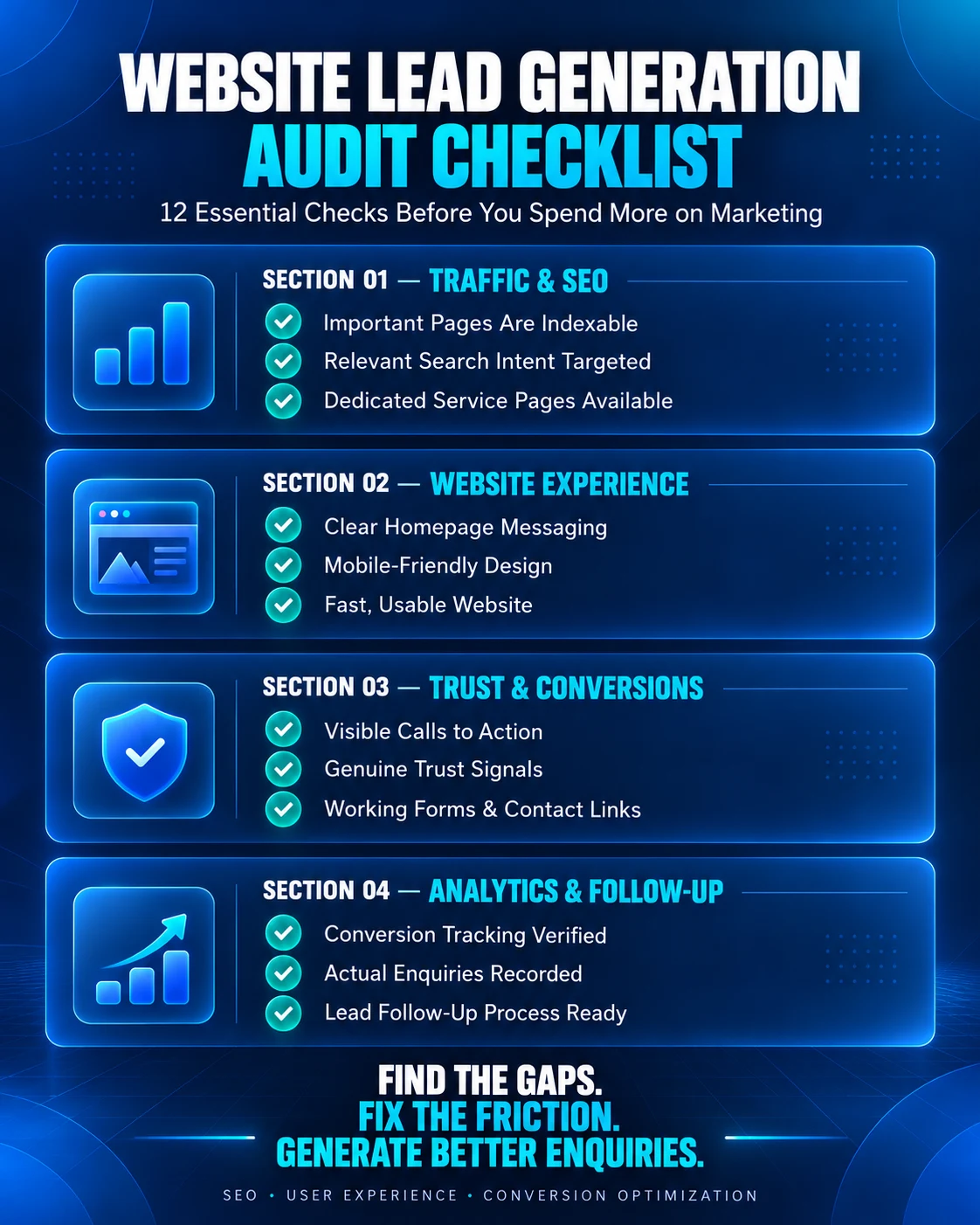
Use this checklist to identify common problems.
Traffic & SEO
- □ Important service pages are indexable.
- □ Website content targets relevant customer intent.
- □ Main services have useful, dedicated landing pages.
- □ Internal links help visitors discover related information.
Website Design & User Experience
- □ The homepage explains the business clearly.
- □ Navigation is easy to understand.
- □ Important pages work on mobile devices.
- □ Text and buttons are readable and usable.
- □ Key pages have been checked for performance problems.
Trust & Conversion
- □ Each important page has a clear next step.
- □ Contact information is accurate.
- □ Testimonials and portfolio claims are genuine.
- □ Contact forms have been tested successfully.
- □ WhatsApp and phone links work correctly.
- □ Pricing and scope information is sufficiently clear.
Analytics & Follow-up
- □ GA4 tracking is configured and tested.
- □ Successful enquiries are measured separately from clicks.
- □ Incoming enquiries are received and reviewed.
- □ Someone is responsible for responding to potential customers.
If several items are incomplete, those are useful starting points for your website improvement plan.
Does Your Website Need a Complete Redesign?
Not every website with low leads needs a complete redesign.
If the website is technically sound and easy to use, targeted improvements to messaging, CTAs, service pages, forms, or tracking may be sufficient.
A larger redesign may be worth evaluating when the current website has widespread navigation problems, consistently poor mobile usability, outdated architecture, inaccessible interfaces, or significant limitations that cannot be addressed efficiently.
Before deciding, compare:
- The severity of existing problems.
- The cost of targeted improvements.
- The cost and disruption of rebuilding.
- The expected benefits and business priorities.
- Whether essential features can be retained.
A redesign should solve defined user and business problems, not simply replace an older visual style.
Explore Web Design Services if your current website requires broader design improvements.
Frequently Asked Questions
Why is my website getting traffic but no leads?
Your website may attract visitors who are not ready to buy, or it may fail to provide a clear service offer, sufficient trust, and an easy way to enquire. Check traffic quality, mobile usability, contact forms, calls to action, and analytics before choosing a solution.
How can I generate more leads from my business website?
Improve the relevance of your traffic, explain your services clearly, add useful calls to action, build genuine trust, and simplify contact methods. Measure confirmed enquiries and improve the pages where relevant visitors abandon the process.
How many website visitors do I need to generate leads?
There is no fixed number. Lead volume depends on the type and quality of visitors, your service, customer intent, and conversion rate. A smaller number of highly relevant visitors can produce more useful enquiries than a large volume of unrelated traffic.
Why am I not getting enquiries from my website in India?
Possible reasons include low visibility for relevant searches, unclear service-area information, weak mobile usability, incorrect contact details, difficult forms, or poor follow-up. Businesses should test the complete enquiry journey and address the problems supported by evidence.
Can SEO help a website generate more leads?
SEO can help relevant customers discover your business through search engines. However, increased visibility does not automatically create leads. Your pages must also answer the right questions, communicate a suitable offer, and make enquiries easy.
Do I need Google Ads to generate website leads?
Not necessarily. Businesses can attract leads through organic search, referrals, social channels, and other sources. Google Ads can provide an additional acquisition channel, but its results depend on targeting, budgets, landing-page relevance, and the overall sales process.
Does adding a WhatsApp button increase website leads?
A working WhatsApp button can make contacting a business more convenient. However, its impact depends on placement, user intent, mobile usability, and how enquiries are handled. Measure actual conversations and qualified leads rather than assuming every button click is a successful enquiry.
What is a good website lead conversion rate?
There is no universal rate suitable for every business. Conversion rates depend on industry, lead definition, visitor intent, traffic channel, and service offering. Establish a reliable baseline and evaluate improvements using comparable data.
Should I redesign my website if it is not generating leads?
Only after identifying the underlying problems. If your issues involve weak CTAs, unclear content, or a broken form, targeted fixes may be enough. A redesign is more appropriate when broader structural, technical, or usability problems justify rebuilding.
How can I track website leads accurately?
Use Google Analytics 4 for website interactions, Google Search Console for search visibility, and your inbox or CRM for confirmed enquiries. Track form submissions, contact clicks, qualified leads, and customer outcomes as separate stages where possible.
Final Thoughts: Turn Your Website Into a More Effective Business Tool
If your business website is not generating leads, the answer is not always more advertising, more content, or a completely new design.
Start by asking three questions:
- Are the right people finding your website?
- Does your website help them understand and trust your business?
- Can they contact you easily, and does your business respond effectively?
A successful improvement strategy connects visibility, user experience, contact functionality, measurement, and lead management.
Begin with the problems you can verify. Fix the most important obstacles, measure the results, and continue improving the website based on real customer behaviour.
Need Help Finding Out Why Your Website Is Not Generating Leads?
At Webtrix Innovations, we provide website design, web development, SEO, landing page design, and related digital services for businesses in Vasai, Virar, Mumbai, and beyond.
If your website is struggling to generate enquiries, start by identifying what may be preventing visitors from taking action.
You can also discuss your website requirements to explore possible improvements based on your business needs.
Website improvements should be evaluated against your requirements and available data. Traffic growth, search rankings, conversion rates, and lead volumes cannot be guaranteed.
Research & Further Reading
This article draws on established search, analytics, web performance, and accessibility guidance:
- Google Search Central — Using Search Console and Google Analytics Data
- Google Search Central — Creating Helpful, Reliable, People-First Content
- Google Search Central — Mobile-First Indexing Best Practices
- web.dev — Core Web Vitals
- Google Analytics — How to Generate More Leads on Your Website
- Google Analytics — Recommended Events
- Google Ads — Landing Page Experience
- W3C — Web Content Accessibility Guidelines 2.2
Editorial note: The conversion calculations and business examples are illustrative. They are not claims about client projects or guaranteed outcomes.
Need help diagnosing website lead drop-off?
Explore our digital marketing and conversion optimization services to turn visitors into confirmed customer enquiries.
About Webtrix Innovations
Webtrix Innovations designs and develops modern websites, web applications, e-commerce stores, and digital marketing strategies for growing businesses.


