Why Is My Business Not Showing on Google Maps? 17 Fixes for Indian Businesses in 2026
Business not showing on Google Maps? Diagnose verification, eligibility and ranking issues with 17 practical fixes for Indian businesses.

Your Google Business Profile is live. Your business is real. Your website is working.
Yet when potential customers search for your service on Google Maps, your business is missing—or appears so far down that almost nobody finds it.
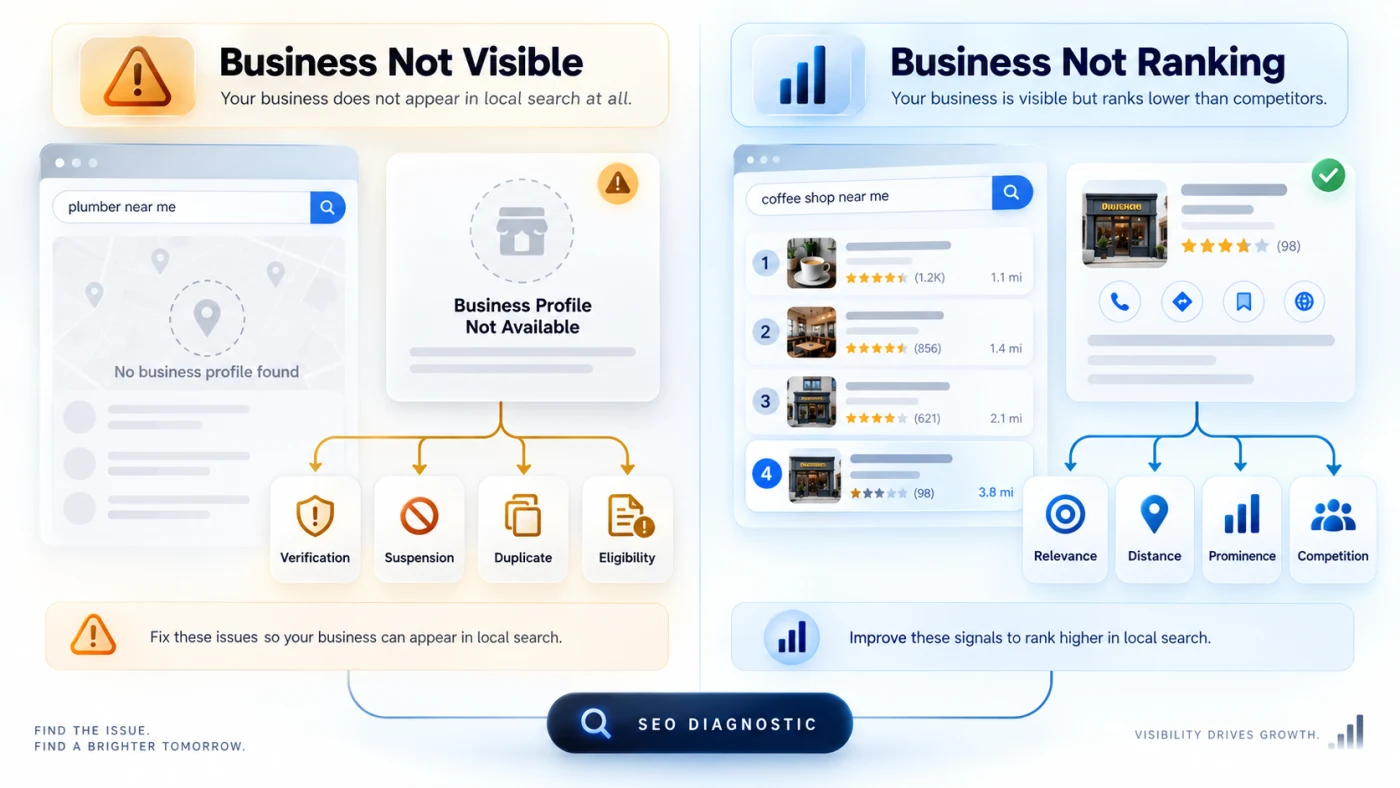
If this sounds familiar, the first thing to understand is that “not showing on Google Maps” and “not ranking well on Google Maps” are two different problems.
A business may be missing because its profile is unverified, suspended, duplicated, incorrectly configured or ineligible. In other cases, the profile is perfectly active but simply does not rank strongly for searches such as “dentist near me,” “salon in Mumbai,” “AC repair near me,” or “digital marketing agency near me.”
Google says local results are primarily determined by relevance, distance and prominence. There is no legitimate way to pay Google for a better organic Maps position.
This guide explains how to diagnose the problem and fix the most common Google Maps visibility issues affecting Indian businesses in 2026.
Quick Answer: Why Is My Business Not Showing on Google Maps?
If your business is not appearing on Google Maps, the most common causes are:
- Your Google Business Profile has not been fully verified.
- Google is requesting re-verification.
- Your business is not eligible for a Business Profile.
- Your profile has been suspended or disabled.
- Your business name or other information violates Google's guidelines.
- Your primary category does not accurately describe your business.
- Your address, map pin or service area is incorrect.
- Google has detected a duplicate profile.
- Your profile information is incomplete or inconsistent.
- Your website provides weak local relevance signals.
- Your competitors have stronger prominence, reviews or web authority.
- The person searching is simply too far from your business for that particular query.
Start by determining which type of visibility problem you actually have before making changes.
First: Is Your Business Missing or Simply Not Ranking?
Before editing anything, perform three searches.
Test 1: Search your exact business name
Search for your complete business name.
For example:
“ABC Dental Clinic Mumbai”
If your Business Profile does not appear even for an exact branded search, investigate verification, eligibility, suspension, ownership or duplicate-profile issues first.
Test 2: Search your main service + location
For example:
“dentist in Andheri”
or:
“AC repair in Pune”
If your profile appears for your business name but not for service searches, you probably have a local ranking and relevance problem, rather than a profile visibility problem.
Test 3: Check your Business Profile status
When logged in to the Google account managing the profile, look for messages such as:
- Get verified
- Verification required
- Suspended
- Disabled
- Processing
- Duplicate
These require different fixes.
Google does not guarantee a particular Maps position simply because a profile is verified and complete. Local visibility continues to depend on relevance, distance, prominence and other search signals.
How Does Google Decide Which Businesses Appear on Maps?
Understanding this saves business owners from wasting time on myths and shortcuts.
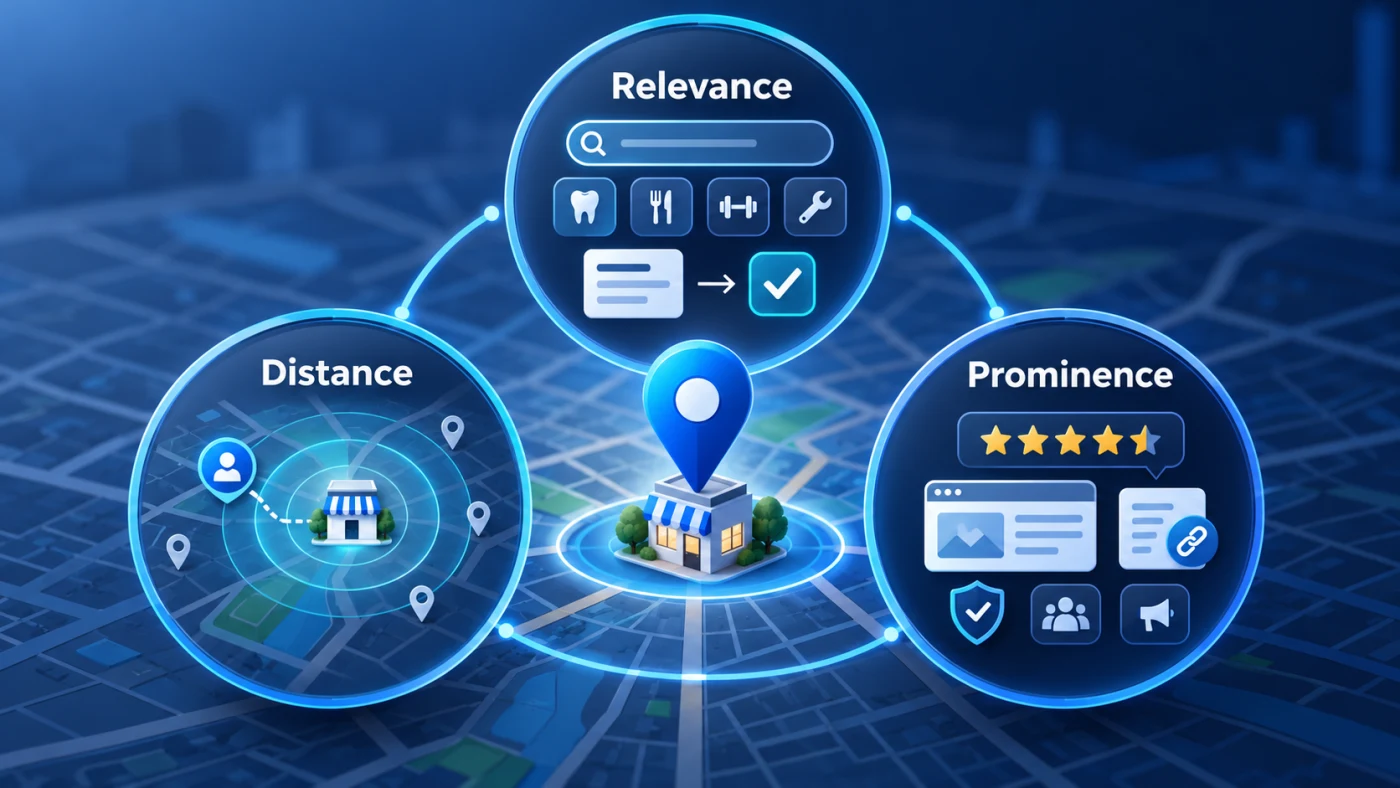
Google says local results are mainly based on relevance, distance and prominence.
1. Relevance
Relevance is how closely your business matches what the user is searching for.
If someone searches for:
“orthodontist near me”
Google needs enough accurate information to understand whether you are actually an orthodontist.
Your categories, services, business information, website content and broader online presence can help clarify what your business does.
2. Distance
Google considers how far a relevant business is from the person performing the search.
If the searcher does not explicitly provide a location, Google can use available location information to estimate where that person is searching from.
This is why two people in the same city can see different Maps results.
3. Prominence
Prominence broadly reflects how well-known or established a business appears.
Google states that information such as links to a business, reviews and ratings can contribute to local prominence.
This means Google Maps optimization is bigger than simply editing your Business Profile.
Your website, reputation and wider online business presence also matter.
17 Fixes When Your Business Is Not Showing on Google Maps
Fix #1: Claim and Verify Your Google Business Profile
First, add or claim your Business Profile and complete verification so you can manage how your eligible business appears across Google.
Google states that adding and verifying a Business Profile allows customers to find an eligible business on Search and Maps and gives the owner control over its information.
If you see a “Get verified” option, complete the verification process before worrying about rankings.
Google decides which verification methods are available to a particular business. You may not necessarily receive the same verification method that another business receives.
What to check
Confirm that:
- You are logged into the correct Google account.
- You control or are authorised to represent the business.
- Your business name is accurate.
- Your business location or service-area setup is accurate.
- Your phone and website genuinely represent the business.
Do not repeatedly create new profiles because verification is difficult. Doing so can create duplicate-profile problems later.
Fix #2: Make Sure Your Business Is Actually Eligible
Not every company is eligible for a Google Business Profile.
Google Business Profile eligibility guidelines generally require a business to have in-person contact with customers during its stated hours, subject to certain exceptions. Purely online businesses are generally not eligible.
For example, a local plumber who visits customers can qualify as a service-area business.
A physical dental clinic can qualify as a storefront.
But an online-only business with no face-to-face customer contact may not qualify simply because it wants to appear on Maps.
Trying to force an ineligible business onto Google Maps can create bigger problems than it solves.
Fix #3: Complete Video Verification Correctly
Video verification has become an important issue for many businesses.
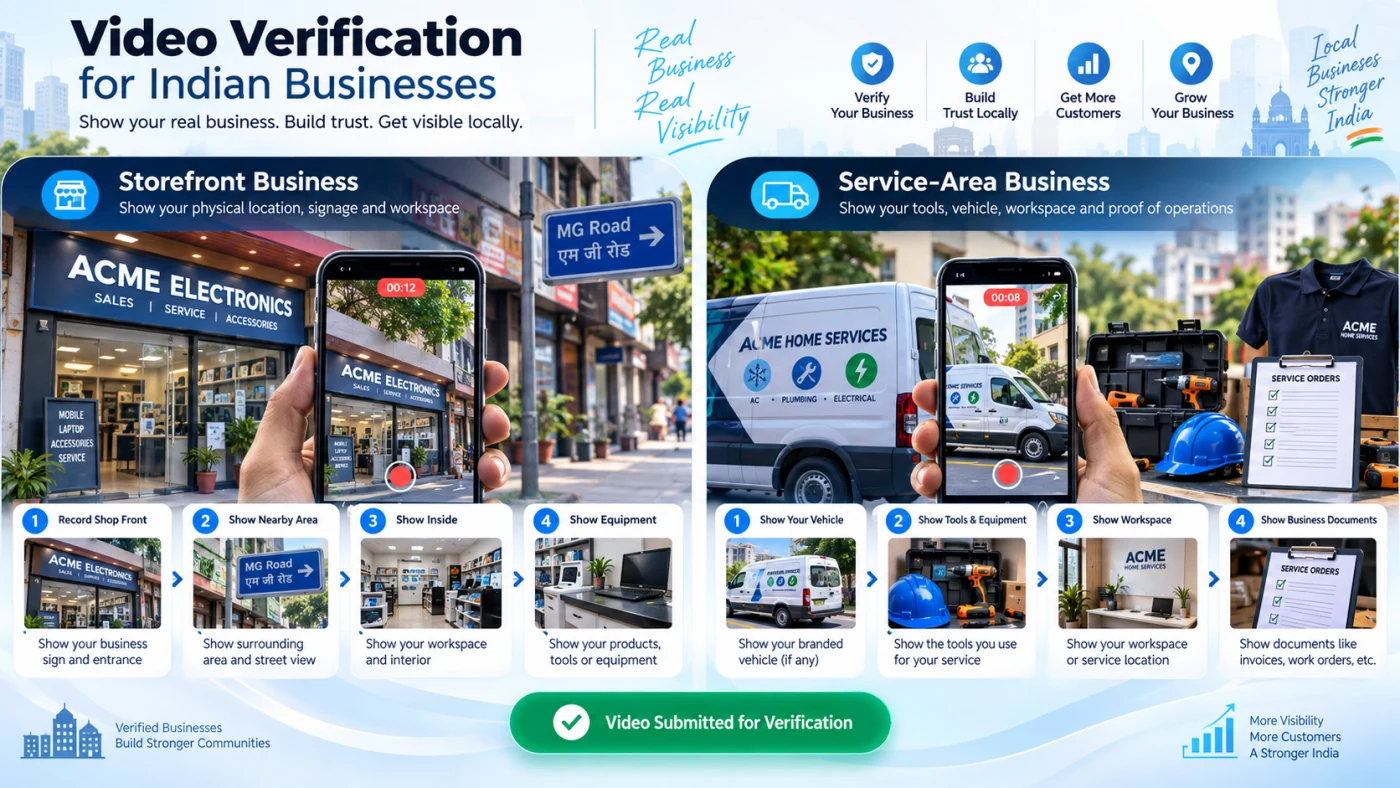
If Google offers video verification, record the video live through the Business Profile process. Google's video verification process requires the recording to be unique, unedited, continuous and at least 30 seconds long.
For a storefront business
Google may expect the video to show:
- Surrounding streets or recognisable location indicators
- Building numbers or nearby businesses
- Your permanent business signage
- A business name matching your profile
- Evidence that you manage the business, such as accessing employee-only areas or systems
For a service-area business
The video may need to establish:
- The location from which the business operates
- Professional tools or equipment
- Work vehicles or branded materials where applicable
- A workspace
- Business-related documents
- Proof that you control or operate the business
Google specifically says businesses without permanent on-site signage should not represent themselves as storefronts merely to display an address.
Common verification mistake
Do not create a polished marketing video.
Verification footage is evidence—not an advertisement.
Show clear proof of location, business existence and management.
Fix #4: Complete Re-Verification When Google Requests It
A business that was previously verified may sometimes be asked to verify again.
If the “Get verified” button reappears, Google's current guidance says this means it could not completely verify the business and the profile should be re-verified.
A significant business information change can also trigger another verification process.
For example, Google states that moving a verified business to a new address requires verification again.
Do not assume:
“I verified this profile two years ago, so verification can never be requested again.”
Check the actual status shown in your dashboard.
Fix #5: Resolve a Suspended or Disabled Business Profile Properly
If your profile specifically says Suspended or Disabled, repeatedly changing categories, adding photos or posting updates is unlikely to solve the underlying problem.
First review Google's Business Profile guidelines and identify what may be incorrect.
If your Business Profile is suspended or disabled, review the guidelines and use the official Google Business Profile appeals process.
Google says supporting evidence can include documents such as:
- Official business registration
- Business licences
- Tax certificates
- Business utility bills
The details on supporting documents should match the profile being appealed.
Important
Google specifically advises against creating another Business Profile for the same business while a suspension appeal is under review.
Creating another profile can complicate the issue.
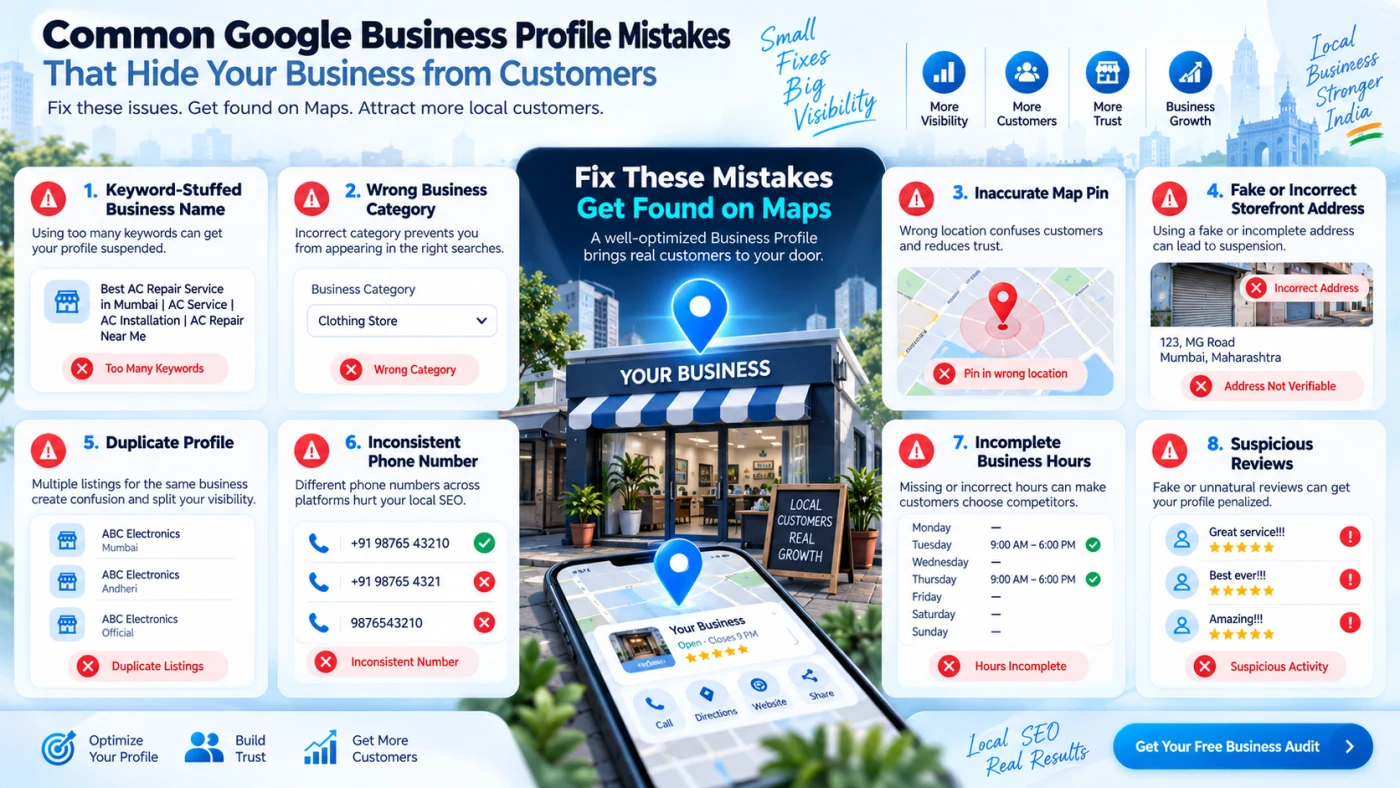
Fix #6: Remove Keyword Stuffing From Your Business Name
One of the most common local SEO mistakes is turning the Business Profile name into an advertisement.
Imagine the real business name is:
Rahul Dental Clinic
But the Google profile says:
Rahul Dental Clinic – Best Dentist in Mumbai | Dental Implant & Root Canal Specialist
This may look good from an SEO perspective, but it does not comply with Google's naming guidelines unless that is genuinely the business's consistent real-world name.
Google says your Business Profile name should reflect the real-world name used consistently on your storefront, website, stationery and branding. Adding unnecessary information can result in suspension.
Use other Business Profile fields to describe your services.
Your business name field is not a keyword container.
Your Business Profile should use your genuine real-world business name and follow Google Business Profile guidelines.
Fix #7: Choose the Right Primary Business Category
Your primary category helps Google understand what kind of business you operate.
Google recommends selecting the specific category that best represents the main business rather than using categories simply as keywords. Businesses can also add additional relevant categories.
For example, if your primary business is an orthodontic clinic, a precise relevant category can communicate far more than a broad category that only loosely describes the business.
Avoid two extremes
Too broad: Selecting a vague category when a more precise one genuinely describes the company.
Too aggressive: Adding unrelated categories because you want to rank for more services.
Your categories should describe the business that actually exists.
Fix #8: Complete and Update Your Core Business Information
Google says businesses with complete and accurate information are more likely to appear in relevant local results.
Review:
- Business name
- Primary category
- Additional relevant categories
- Phone number
- Website
- Address or service area
- Opening hours
- Holiday/special hours
- Services
- Business description
- Applicable attributes
A forgotten holiday schedule may sound minor, but customers and search systems should not encounter conflicting information.
Accurate information also improves conversion.
Ranking is useless if customers call an outdated number or arrive when the business is closed.
Fix #9: Correct Your Address and Map Pin
If customers visit your premises, your Google Maps location must accurately represent the real business.
Follow Google's business address guidelines: enter your complete official address and adjust the map pin when necessary.
Check:
- Building number
- Street name
- Floor or unit number where appropriate
- Postal code
- City
- State
- Map pin position
Do not add promotional information into address fields.
And do not invent virtual-office locations simply to rank in additional cities.
Local visibility built on false information is not a sustainable SEO strategy.
Fix #10: Configure Service-Area Businesses Correctly
Many Indian agencies, consultants, technicians, plumbers, electricians, home-service companies and mobile professionals do not receive customers at their operating address.
Businesses that visit customers but do not serve customers at their address should follow Google's service-area business guidelines.
Google says service-area businesses that do not serve customers at their address should remove the public-facing address and specify genuine service areas instead.
Google currently allows businesses to define up to 20 service areas using cities, postal codes or other supported geographic areas, and recommends keeping the overall service area reasonably close to where the business is based.
Important misconception
Adding more service areas does not mean Google must rank you equally across all of them.
Google still uses distance as a local-ranking factor.
Be accurate rather than aggressive.
Fix #11: Find and Resolve Duplicate Profiles
Search Google Maps for:
- Your business name
- Previous business names
- Your phone number
- Your exact address
- Old locations
You may discover an old or duplicate profile.
Google generally allows one Business Profile per business, with exceptions for eligible separately staffed locations, departments and individual practitioners. If Google identifies a profile as a duplicate, that duplicate may not appear on Search or Maps.
Duplicates can occur after:
- An employee creates another listing
- An agency creates a replacement instead of requesting access
- The business changes address
- Multiple listings are created for different services
- An older profile already existed
Resolve ownership or duplicate issues instead of creating a third listing.
Fix #12: Make Your Website Clearly Explain What You Do and Where You Operate
Local SEO does not stop inside Google Business Profile.
Google can use publicly available website content as one of the sources for business information shown in profiles and local search experiences.
Your website should clearly answer:
Who are you?
What services do you provide?
Which customers do you serve?
Where do you genuinely operate?
A homepage saying only:
“We provide innovative solutions for modern businesses.”
does not give search systems much useful context.
Compare that with:
“Webtrix Innovations provides web development, SEO, Local SEO, digital marketing and related digital services for businesses.”
The second statement identifies actual entities and services.
Build strong service pages
Instead of mentioning 15 services in one paragraph, maintain dedicated useful pages explaining important services.
For local businesses with genuine location relevance, location pages can also help—but they must provide real local value.
Do not create hundreds of near-identical pages where only the city name changes.
Fix #13: Align Your Business Information Across the Web
Search systems should not encounter five versions of the same company.
For example:
Google Business Profile:
ABC Dental Care
Website:
ABC Advanced Dental
Directory:
ABC Dental Clinic
Another listing:
Old address and old phone number.
This creates unnecessary ambiguity.
Keep your important business details consistent across trusted sources:
- Business website
- Google Business Profile
- Bing Places
- Relevant industry directories
- Major mapping platforms
- Legitimate local listings
- Social profiles where applicable
Focus on authoritative, relevant listings—not hundreds of low-quality directory submissions.
Add structured business information to your website
Schema.org structured data can help machines understand clearly defined business information.
Depending on the business and page, appropriate markup can include:
- Organization
- LocalBusiness
- PostalAddress
- Contact information
- Opening hours
- Website URL
Businesses can use LocalBusiness structured data to communicate structured factual information about their business to Google.
Structured data must match what users can actually see on the website.
Do not put fake locations, fake ratings or misleading information into schema.
Fix #14: Build Genuine Customer Reviews
Reviews serve two purposes.
First, they help potential customers decide whether to contact you.
Second, Google states that review count and positive ratings can contribute to local ranking and prominence.
Create a simple, ethical process:
- Complete the customer interaction.
- Ask the customer for honest feedback.
- Send Google's official review link or QR code.
- Respond professionally to feedback.
Ask genuine customers for honest feedback and follow Google's review guidelines.
However, paying for reviews, offering discounts or rewards in exchange for reviews, selectively asking only happy customers or manipulating review sentiment violates Google's policies.
Never buy Google reviews
Ten genuine customer reviews are worth far more to your long-term business reputation than a profile filled with suspicious purchased ratings.
Fix #15: Add Genuine Photos and Videos
Visual content helps customers validate that a business is real.
Useful Business Profile images can include:
- Storefront
- Interior
- Team
- Products
- Equipment
- Completed work
- Service environment
- Office where customers genuinely visit
- Menu or product displays where relevant
Google recommends adding photos and videos to help complete the profile and help customers understand the business.
Do not treat image uploading as a guaranteed ranking trick.
Use visual content because it improves business clarity, trust and customer decision-making.
Real photos are usually more useful for local trust than endless generic stock graphics.
Fix #16: Strengthen Your Business's Prominence Beyond Google Maps
Your competitors may have more than just a better Google Business Profile.
They may also have:
- Stronger websites
- More relevant backlinks
- Industry mentions
- Local press coverage
- Better-known brands
- More genuine customer reviews
- Useful local content
- Stronger authority around specific services
Google explicitly notes that prominence can be influenced by information such as links and reviews.
This is why sustainable Google Maps growth often requires both:
Google Business Profile optimization
and
Website/local SEO improvement
Build a business that is consistently represented and genuinely referenced across the web rather than searching for a single ranking hack.
Fix #17: Measure Local Rankings Correctly
One of the biggest mistakes is searching for your own keyword once from your own mobile phone and assuming that is your universal Maps position.
Remember the distance factor.
A business may appear strongly when the searcher is 1 km away and differently when the searcher is 8 km away.
Search results can also depend on:
- Searcher's location
- Exact query
- Search context
- Competitors near the searcher
- Business relevance
- Time and business availability
- Changes in Google's systems
Track multiple meaningful queries rather than one vanity keyword.
Examples:
- dentist near me
- dental implants in [area]
- emergency dentist [city]
- orthodontist [area]
Measure visibility alongside actual business outcomes:
- Website visits
- Calls
- Direction requests
- Enquiries
- Appointment bookings
- Organic landing-page traffic
The objective is not simply “position #1.”
The objective is qualified local discovery that contributes to real business opportunities.
Google Maps Ranking Checklist for 2026
Use this checklist before spending money on advanced Local SEO.
| Area | What to check |
|---|---|
| Verification | Profile is verified and no re-verification request is pending |
| Eligibility | Business genuinely qualifies for Google Business Profile |
| Business Name | Matches real-world branding |
| Primary Category | Accurately describes the main business |
| Additional Categories | Only genuinely relevant categories added |
| Address | Correct and publicly shown only when appropriate |
| Map Pin | Positioned accurately |
| Service Area | Matches genuine operating territory |
| Hours | Regular and special hours are current |
| Phone | Direct and working |
| Website | Correct HTTPS business website |
| Services | Important services are clearly listed |
| Reviews | Genuine customer reviews are being collected ethically |
| Review Replies | Customer feedback receives professional responses |
| Photos | Genuine current business images available |
| Website SEO | Service and location relevance are clearly explained |
| Structured Data | Business schema matches visible factual information |
| Business Listings | Major listings contain consistent information |
| Duplicates | No unnecessary duplicate Business Profiles |
| Measurement | Local visibility and conversions are being tracked |
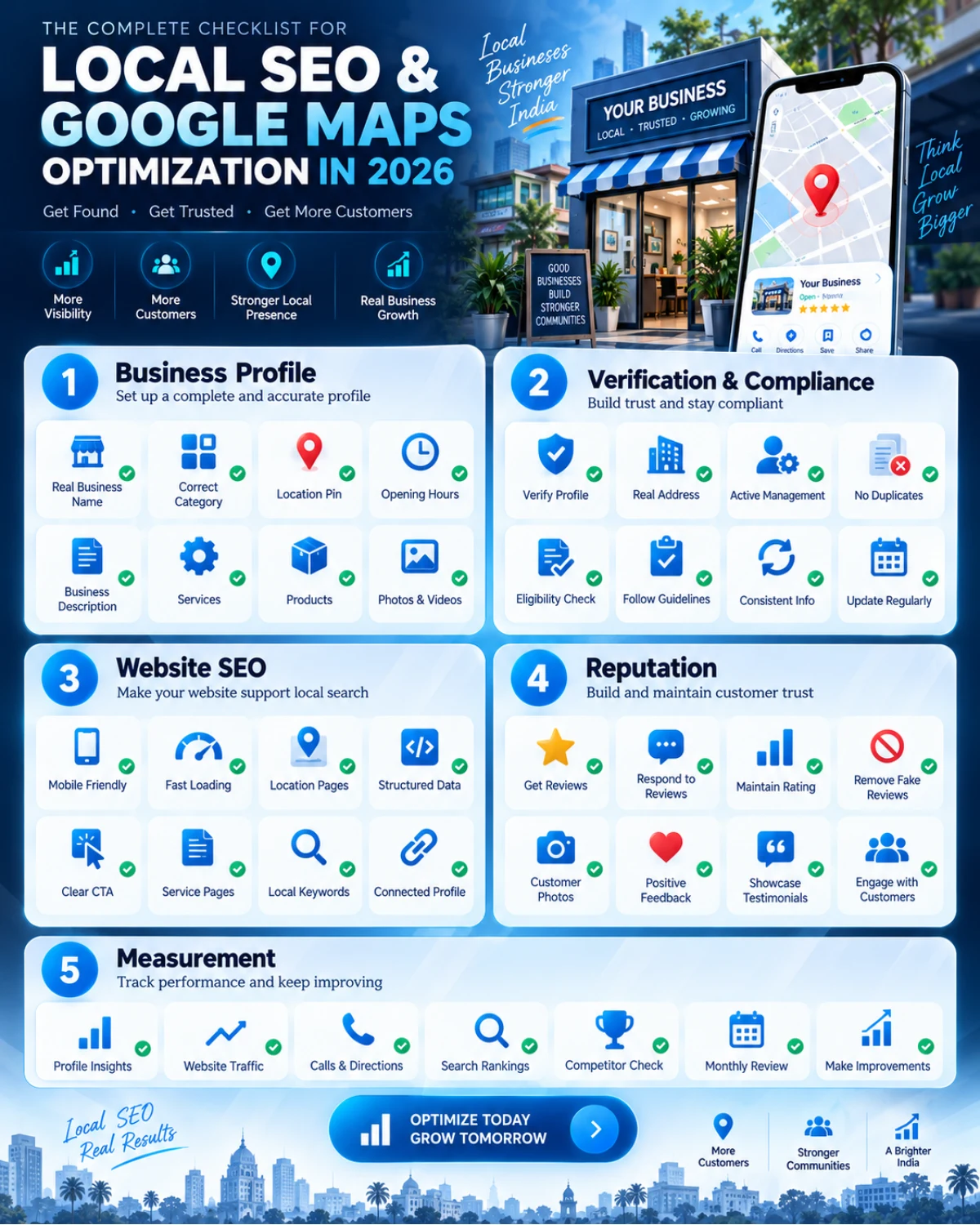
Why Your Website Matters for Google Maps Visibility
Our SEO Optimization service helps strengthen crawlability, service-page relevance and the website foundations that support local discovery.
A common misconception is:
“Google Maps SEO has nothing to do with my website.”
That is too simplistic.
Google states that public web content can contribute information used in Business Profiles, while Google's local-ranking guidance also refers to web links when explaining prominence.
Your website therefore gives search systems additional evidence about your business.
A strong local-business website should provide:
Clear service definitions
Each important service should be understandable without marketing jargon.
Clear business identity
Use consistent business branding and contact details.
Useful geographic context
Mention genuine operating locations naturally where relevant.
Crawlable internal links
Important service and location pages should be connected using standard crawlable links.
Google recommends crawlable internal links because they help Google discover pages and understand their relevance.
Helpful location pages
If you genuinely operate multiple physical branches, individual location pages can explain:
- Address
- Directions
- Hours
- Local contact details
- Services available at that location
- Local staff
- Location-specific information
Avoid mass-produced doorway pages created only by replacing one city name with another.
Can LocalBusiness Schema Make You Rank #1?
No.
Schema markup is not a magic Maps-ranking button.
Structured data gives machines a structured description of information already represented by your website.
It can help reduce ambiguity around details such as:
- Business identity
- Address
- Contact information
- Opening hours
- Website
- Business type
Google supports structured data such as Organization and LocalBusiness, but adding valid markup does not guarantee a specific ranking or search feature.
Think of schema as clarification, not manipulation.
How Google Maps Visibility Connects With AI Search in 2026
Search behaviour is changing.
Potential customers increasingly ask complete questions instead of entering two or three keywords.
For example:
“Which web development agencies provide Local SEO support for small businesses?”
“Find a reliable dental clinic near me that offers implants.”
“Which digital marketing companies help businesses improve Google Maps visibility?”
Generative search systems need clear, reliable information to answer these questions.
Google's guidance on AI-powered search explains that traditional SEO foundations remain relevant for its generative AI experiences. Pages should be crawlable, indexable, helpful, textually understandable and supported by accurate structured information. Google also explicitly recommends keeping Business Profile information current.
Google does not require a special “AI schema” or secret GEO markup to appear in AI Overviews or AI Mode.
For businesses, this means AI visibility begins with the same foundations:
Clear entity + clear services + accurate locations + strong website + genuine reputation + crawlable content.
For ChatGPT Search and AI assistant discovery, follow OpenAI's publisher guidance for ChatGPT Search: allow OAI-SearchBot to crawl public content you want included in summaries and snippets. Crawler access supports discovery; it does not guarantee a citation.
Businesses are also increasingly being discovered through AI-powered search experiences. Our guide to business visibility in ChatGPT and AI Search explains the technical and content foundations involved.
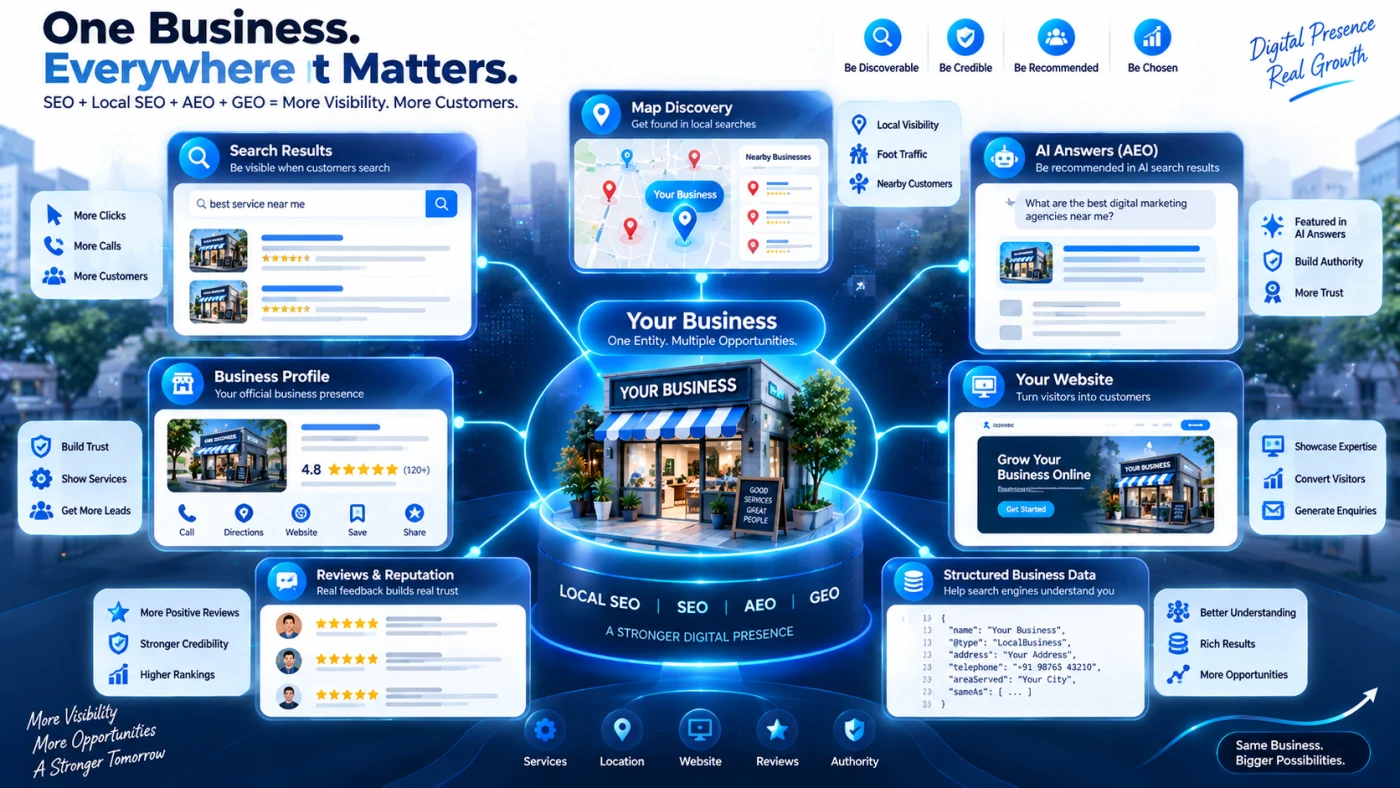
What Makes a Business Easier for AI Systems to Understand?
If you want search and AI systems to confidently understand your company, remove ambiguity.
Your website should make statements such as:
Webtrix Innovations is a digital technology and growth agency providing web development, SEO optimization, Local SEO, digital marketing and related digital services.
Then support those statements with dedicated service pages, business information, useful educational content and consistent external business profiles.
Avoid vague homepage copy such as:
“Transforming dreams into digital excellence.”
That may sound attractive to a human, but it does not explain what the company actually does.
AI-search visibility is strengthened when machines can repeatedly find consistent answers to questions such as:
- What is this company?
- What does it provide?
- Who does it serve?
- Where does it operate?
- What evidence supports those claims?
- Which pages explain each service?
- Is the information recent?
- Do external sources describe the same entity consistently?
This is where SEO, Local SEO, AEO and GEO increasingly overlap.
A Practical Example
Imagine two dental clinics operate in the same area.
Clinic A
Its Google Business Profile contains:
- Accurate name
- Correct primary category
- Verified address
- Current hours
- Genuine reviews
- Recent photographs
Its website contains:
- Dental implant service page
- Root canal service page
- Dentist/team information
- Correct address
- Contact information
- Location-specific content
- Structured business information
Other trusted websites reference the same clinic name and address.
Clinic B
Its Google profile has:
- Keyword-stuffed name
- Old phone number
- Few details
Its website says:
“We provide the best healthcare solutions.”
There are no detailed treatment pages and several directories display different addresses.
Which entity is easier for a search system—or an AI retrieval system—to understand confidently?
Clinic A provides clearer, more consistent evidence.
That is the foundation businesses should aim for.
How Long Does It Take to Improve Google Maps Rankings?
There is no universal Local SEO timeline.
Some corrections—such as fixing opening hours—can be submitted immediately.
Other changes depend on:
- Google's review processes
- Re-verification
- Re-crawling and indexing
- Competition
- Search location
- Existing website authority
- Reviews and reputation
- Business prominence
- Website changes
Google does not allow businesses to request or pay for a better organic local ranking.
Be cautious with anyone promising:
“Guaranteed #1 Google Maps position in seven days.”
A legitimate Local SEO strategy improves your business's discoverability and search signals but cannot control Google's final ranking decisions.
Frequently Asked Questions
Why is my verified business not showing on Google Maps?
Verification does not guarantee strong ranking for every keyword. First search your exact business name. If the profile appears for the brand but not generic service searches, the issue is likely related to relevance, distance, prominence or competition rather than basic verification.
Why does my business rank from one location but not another?
Google uses distance as one of its main local-ranking considerations. Two users standing in different areas can therefore receive different local results.
Does adding more Google Business Profile categories improve ranking?
Add categories only when they genuinely describe your business. Google recommends choosing the most specific category representing your main business and adding other relevant categories where appropriate. Categories should not be used simply as keywords.
Should I put keywords in my Google Business Profile name?
Only if those words are genuinely part of your real-world business name. Google prohibits unnecessary information in the business-name field and says violations can result in suspension.
Do Google reviews help Maps rankings?
Google states that more reviews and positive ratings can help local ranking, but reviews must reflect genuine customer experiences. Buying or incentivising reviews violates Google's policies.
Should a home-based service business show its residential address?
If customers do not visit the location, Google says service-area businesses should hide the address and list their genuine service areas instead.
Can I create several Google Business Profiles to rank in multiple cities?
Do not create fake locations. A service-area business normally uses one profile for the area it genuinely serves unless it operates separately staffed eligible locations.
Can an SEO agency guarantee Google Maps rankings?
No agency controls Google's local-ranking algorithm. Google states that local results are mainly based on relevance, distance and prominence and that businesses cannot request or pay Google for better organic local rankings.
Still Not Sure Why Your Business Is Not Showing on Google Maps?
Google Maps visibility is rarely fixed by one trick.
The problem may involve your Business Profile, verification status, categories, business information, reputation, website structure, local relevance or wider online presence.
Webtrix Innovations provides Local SEO services focused on Google Business Profile foundations, geographic relevance, business-information consistency, website Local SEO and ongoing local-search visibility.
Explore our Local SEO service if you need professional support reviewing your local-search setup.
If your Business Profile is active but you suspect your website is weakening your search visibility, use the Webtrix Innovations Free Website Audit to identify website SEO and technical issues that may need attention.
For broader organic visibility, explore Webtrix Innovations SEO Optimization services.
Important: Google independently controls verification, reinstatement, indexing and ranking. Webtrix Innovations can improve the foundations and signals around your business, but no responsible agency can guarantee a specific Google Maps position.
Final Takeaway
If your business is missing from Google Maps, do not immediately start adding keywords, buying reviews or creating duplicate profiles.
Diagnose the problem first.
Check:
Verification → Eligibility → Policy Compliance → Categories → Location → Service Area → Duplicates → Website → Reviews → Prominence → Measurement
The businesses with the strongest long-term local-search presence are usually not the ones using the most tricks.
They are the businesses giving customers, Google and modern AI-driven discovery systems the clearest and most consistent evidence about who they are, what they offer and where they operate.
Need help implementing this in your business?
Explore our professional development and design capabilities.
About Webtrix Innovations
Webtrix Innovations designs and develops modern websites, web applications, e-commerce stores, and digital marketing strategies for growing businesses.