How to Register and Rank Your Business on Google Maps in 2026 (Step-by-Step Guide)
Learn how to register a business on Google Maps in 2026. Master Google Business Profile video verification in India, Local 3-Pack ranking factors, and local SEO.

Every day across India, millions of potential customers search for local products and services using their smartphones.
They search for terms like “web design company near me,” “best dental clinic in Vasai,” “chartered accountant in Andheri,” or “industrial packaging manufacturer in Palghar.”
When these local searches happen, Google does not just show standard blue website links.
Google displays the Google Maps Local 3-Pack—a prominent visual map snippet featuring the top three verified local businesses, complete with star ratings, opening hours, direct phone call buttons, WhatsApp links, and driving directions.
For Indian small and medium businesses (SMBs), retail stores, clinics, and professional agencies, appearing in this Local 3-Pack is often the difference between getting dozens of inbound phone inquiries every week or remaining virtually invisible.
However, registering and ranking a business on Google Maps in 2026 is very different from five years ago.
Google has eliminated traditional postcard postal verification in India due to widespread spam, replacing it with mandatory smartphone video verification, strict business category algorithms, and rigorous Name-Address-Phone (NAP) consistency audits.
This comprehensive, practical guide breaks down exactly how to register a business on google maps in 2026, how to pass Google's strict video verification on your first attempt, and the exact local SEO ranking strategies required to climb into the top 3 spots.
To understand how to register a business on google maps in 2026: visit google.com/business, enter your exact registered business name (without keyword stuffing), select your primary business category, and choose whether you operate a physical storefront or a Service Area Business (SAB). In India, verification now requires an unedited 1–2 minute continuous smartphone video demonstrating street signage, physical key unlocking, and proof of management (GST certificate, Udyam registration, or POS billing software). Once verified, businesses rank in the coveted Local 3-Pack by optimizing the three core algorithm pillars: Relevance (complete categories and service menus), Distance (proximity and service radius), and Prominence (consistent NAP citations across directories, 5-star photo reviews, and linked website domain authority).
Key Takeaways: Registering & Ranking on Google Maps (2026 Blueprint)
- 100% Free: Google Business Profile registration is completely free. Never pay third-party telecallers claiming to be Google representatives charging monthly listing fees.
- No More Postcards in India: Video verification is now mandatory for over 90% of Indian business profiles. You must show the street, signboard, door unlocking, and official documents.
- Strict Naming Policy: Never add location keywords or extra slogans to your business name (e.g. naming your profile “XYZ Digital - Best Web Designer in Mumbai”). Doing so triggers instant automated suspension.
- Category Weight: Your primary category carries more ranking weight than any other on-profile element. Choose the single most specific match available.
- The 3-Pack Trinity: Rankings are decided by Relevance (completeness), Distance (proximity to searcher), and Prominence (review velocity, photo reviews, and local citations).
- AI Local Search: An optimized Google Maps profile acts as the single source of truth for conversational local queries inside Google Gemini, Perplexity, and ChatGPT Search.
Quick Answer: How to Register a Business on Google Maps
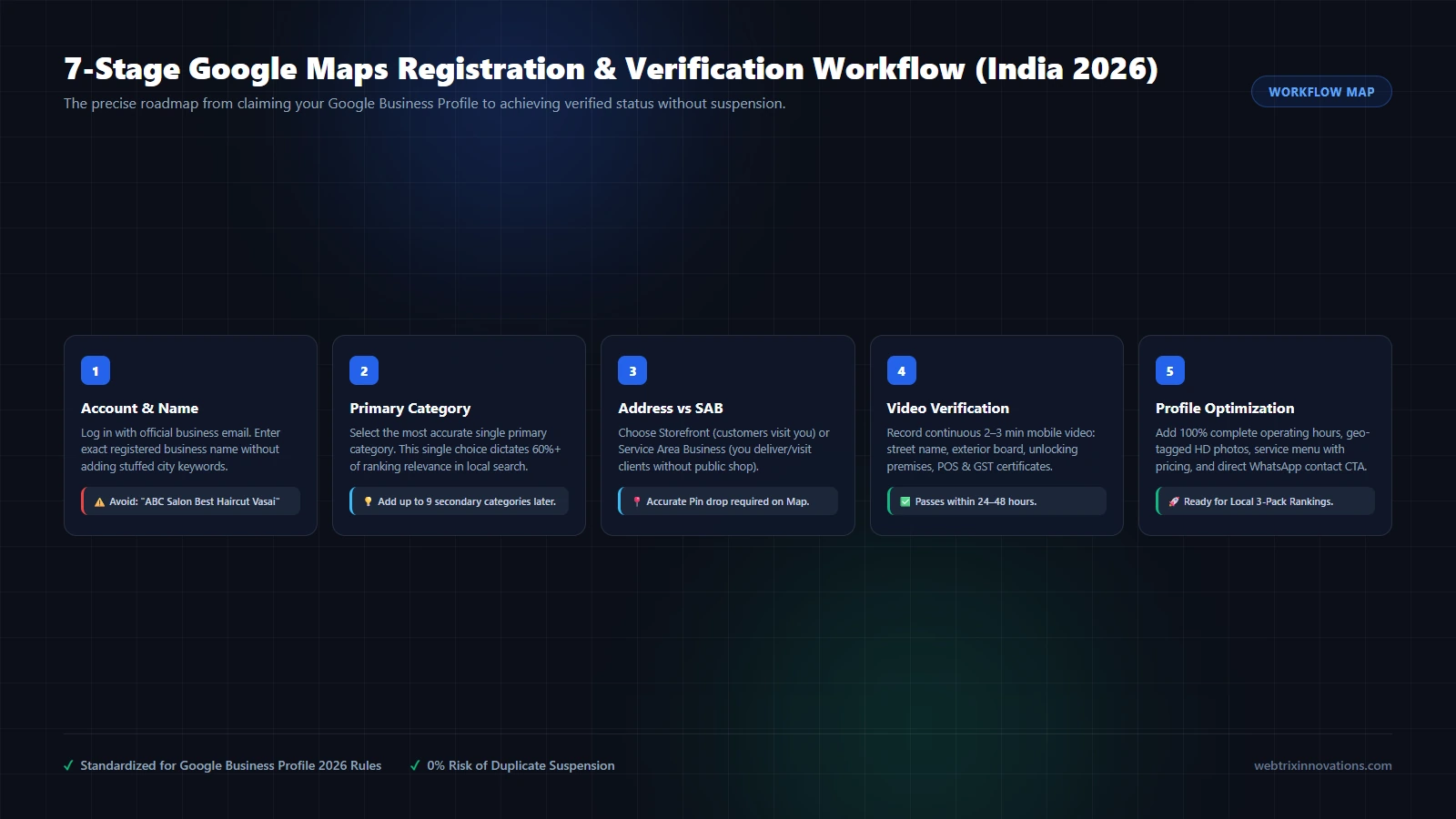
Registering a business on Google Maps involves creating or claiming a free Google Business Profile (formerly Google My Business). Follow these core steps:
- Sign in to Google Business Profile Manager: Navigate to google.com/business using your dedicated company Google account.
- Enter Your Official Business Name: Type your exact registered company name matching your legal tax documents and outdoor signboard.
- Select Business Type: Choose between an Online Retailer, Local Store (customers visit your shop/office), or Service Business (you visit or deliver to customers).
- Choose Your Primary Category: Select the single most accurate category describing your core business (e.g., Website Designer, Software Company, Dental Clinic).
- Set Your Location & Pin Drop: Enter your physical street address, building name, PIN code, and manually adjust the red map pin to your exact building entrance.
- Complete Video Verification: Record an unedited 1–2 minute smartphone video showing your street landmark, permanent signboard, door unlocking, and official proof (GST, PAN, or utility bill).
- Optimize Your Profile: Add business hours, high-resolution geo-tagged photographs, service descriptions with pricing, and your official website URL.
Prerequisites: What You Need Before You Start (India 2026)
Before you open the Google registration portal, preparing your documentation in advance will ensure your profile is verified without frustrating delays or automated suspension.
In 2026, Google employs sophisticated computer-vision AI and regional fraud-detection filters across India. Ensure you have the following ready:
| Requirement | Details & Best Practices | Common Rejection Risk |
|---|---|---|
| Dedicated Google Account | Use a professional Google Workspace email (e.g. agency@webtrixinnovations.com) or a dedicated clean Gmail account. |
Using personal Gmail accounts tied to multiple suspended listings. |
| Permanent Outdoor Signboard | A physical, rigid board (acrylic, metal, flex on frame) displaying the exact business name outside the building or shop. | Paper printouts taped to doors or temporary banners without street context. |
| Government Business Proof | GST Registration Certificate, Udyam Aadhaar, Shop & Establishment Act license, or FSSAI license matching address and name. | Address mismatch between tax document and Google Maps pin code. |
| Operational Workspace Proof | Active physical desk, equipment, POS machine, company letterheads, or branded visiting cards. | Empty residential rooms or virtual co-working addresses without dedicated physical signage. |
| Utility Bill / Rent Agreement | Commercial electricity bill, telephone bill, or registered lease agreement in the business or owner's name. | Unregistered handwritten rent receipts. |
Step 1: Create or Claim Your Google Business Profile
Start by determining whether your business already exists on Google Maps or if you need to create a fresh listing.
Often, customers, local guides, or automated algorithm aggregators might have already generated an unverified placeholder pin for your business.
1. Checking if Your Business Already Exists
Open Google Maps and search your exact company name and locality (e.g., “Webtrix Innovations Vasai”).
- If a profile appears with the link “Own this business? Claim it now”: Click that link. You will be prompted to verify ownership through Google Business Profile Manager. Claiming preserves existing reviews and location check-ins.
- If no matching listing exists: Go directly to google.com/business and click “Manage now” to create a fresh profile.
2. Entering Your Business Name (The Golden Rule)
Google’s official guidelines for representing your business state clearly:
“Your business name should reflect your real-world business name, as used consistently on your storefront, website, stationery, and as recognized by customers.”
Do NOT add keywords, phone numbers, or city names unless they are legally part of your registered name:
- ❌ Incorrect: Apex Dental Clinic - Best Dentist in Vasai West Root Canal Specialist
- ✅ Correct: Apex Dental Clinic
Keyword stuffing in the business name is the number-one cause of instant hard suspensions across India in 2026. Keep your name clean and authentic.
Step 2: Select the Correct Primary and Secondary Categories
Your Primary Category is the single most influential ranking factor on your entire profile. It tells Google's semantic search algorithms what core queries your profile is eligible to compete for.
According to empirical local SEO studies, selecting the wrong primary category can diminish your ranking potential by up to 60%.
How to Choose the Right Category in India:
- Be as specific as possible: If you are a digital agency specializing in website design, choose “Website Designer” rather than the broader “Corporate Office” or generic “Consultant.”
- Add Secondary Categories: Google allows you to select up to 9 secondary categories. For example, a web agency can set:
- Primary: Website Designer
- Secondary 1: Internet Marketing Service
- Secondary 2: Software Company
- Secondary 3: E-commerce Service
- Analyze Top-Ranking Competitors: Search your primary service on Google Maps and observe what category the top 3-pack leaders have displayed below their business name. Align your primary category with the dominant category in your market.
Step 3: Storefront Address vs Service Area Business (SAB)
Google classifies businesses into two fundamental models, and choosing the wrong one can lead to immediate verification failure.
Model A: Storefront Business (Physical Office / Retail Shop)
Choose this if customers visit your physical premises during stated business hours.
- Examples: Retail outlets, dental clinics, restaurants, law firms, and web development agencies with a client consultation office (such as Webtrix Innovations in Vasai West).
- Requirement: You must have permanent exterior signage with your business name visible from the street.
- Display: Your complete street address, building name, and PIN code are published publicly on Google Maps.
Model B: Service Area Business (SAB)
Choose this if you visit customers or deliver products to their doorstep, but do not welcome walk-in customers at your physical address.
- Examples: Plumbers, pest control specialists, home tuition tutors, wedding photographers, mobile repair technicians, and remote freelancers.
- Privacy: You still provide your physical address to Google during verification, but Google hides your street address from the public map, showing only your designated service radius (e.g., “Serves Mumbai, Thane, and Vasai-Virar”).
- Rule: Do not select a Storefront listing if you work from a residential flat without commercial signage. Choose SAB to remain fully compliant with Google policies.
Step 4: Surviving Google Video Verification in India (The Complete Checklist)
In 2026, over 90% of all new Google Business Profile registrations in India are required to complete Video Verification using a mobile smartphone camera.
Google introduces video verification to combat fake listings, lead brokers, and spam networks. The video is analyzed both by Google’s automated computer-vision algorithms and human verification specialists.
The 3 Golden Rules of Google Video Verification:
- Continuous & Uncut: The video must be recorded in one single continuous take (1 to 2 minutes long). Do not pause, cut, or edit the video.
- Clear & Well-Lit: Record during daytime with good natural lighting so text on signboards and documents is sharp and legible.
- Location Services Active: Turn on your mobile smartphone's High-Accuracy GPS before clicking the recording link so Google captures matching geolocation telemetry.
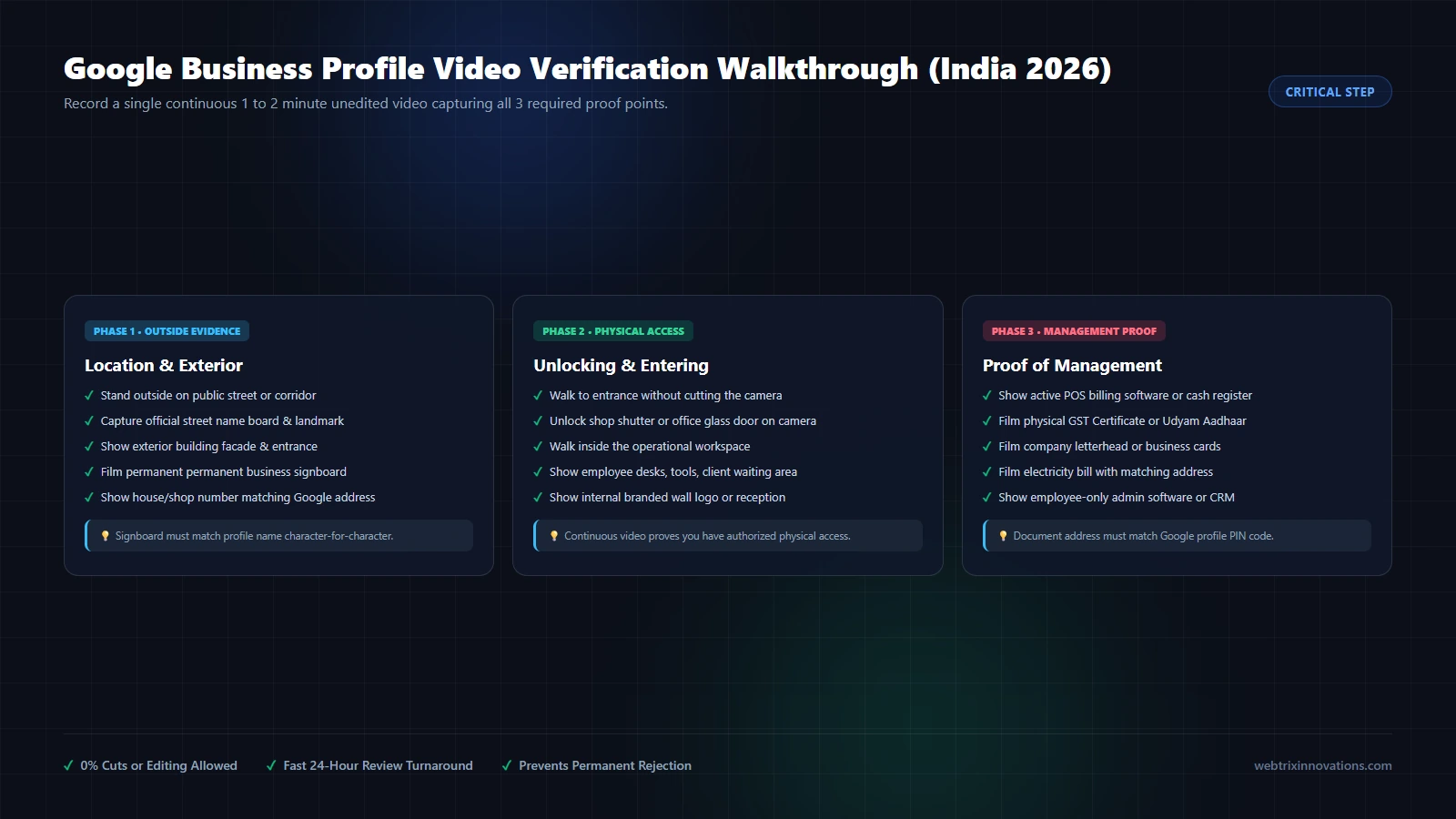
The 3-Phase Recording Walkthrough:
Phase 1: Location & Exterior Street Evidence (0:00 – 0:40)
- Stand outside on the public road or building entryway.
- Pan the camera across the street to capture street name boards, nearby recognizable shops, or prominent local landmarks.
- Pan to the exterior building facade and show the building name.
- Clearly focus on your permanent outdoor commercial signboard displaying your registered business name.
Phase 2: Access & Interior Operational Proof (0:40 – 1:15)
- Without stopping the camera, walk through the building entrance or corridor toward your office or shop door.
- Crucial Step: Use your physical key or biometric scanner to unlock the door or open the shutter on camera. This definitively proves you are an authorized owner/manager, not a random passerby.
- Walk inside and pan across the operational workspace. Show customer reception, work desks, computers, machinery, inventory shelves, or branded wall logos.
Phase 3: Proof of Business Management (1:15 – 2:00)
- Walk to your primary work desk or cash counter.
- Focus the camera closely on physical government documentation: your official GST Certificate, Udyam Aadhaar, or Shop Act License. Ensure the business name and address match your Google profile.
- Show active management tools: an open POS billing software screen, company letterheads, printed visiting cards, or an employee-only management dashboard.
- Submit the video through the Google prompt. Most video reviews in India are processed within 24 to 72 hours.
Step 5: Achieve 100% Profile Completeness for Immediate Trust
Once your verification is approved and your status switches to “Verified,” do not leave your profile blank. Profiles with 100% completed information receive up to 7x more customer clicks than incomplete profiles.
Essential Optimization Items:
- Business Description (750 Characters): Write a comprehensive, human-written summary explaining who you are, what services you provide, your years of experience, and your service region. Weave in natural semantic keywords like “custom web design,” “e-commerce development,” or “SEO services” naturally without robotic repetition.
- Exact Opening Hours: Specify exact opening and closing times for each day of the week. Add special holiday hours during major Indian festivals (Diwali, Eid, Christmas, Independence Day) so customers know you are open.
- Add Products & Services with Descriptions: Populate your Services tab. If you are an agency, list each service (e.g. UI/UX Design, Laravel Web Development, Local SEO Audit) complete with pricing benchmarks and deliverables.
- High-Resolution Geo-Tagged Photography: Upload at least 15 to 25 original photos:
- Profile Logo (square 1:1 format, high contrast)
- Cover Photo (16:9 banner showcasing your team or workspace)
- Exterior daytime building photos
- Interior workspace, meeting rooms, and team in action
- Avoid stock images: Google algorithms detect stock photography and suppress profile visibility.
- Direct Contact Actions: Ensure your verified phone number connects directly to your reception desk or business smartphone. Enable the Google Business Messaging feature or add a direct WhatsApp chat link.
How to Rank in the Google Maps Local 3-Pack (The 2026 Algorithm)
Getting registered and verified makes your business visible on Google Maps. But getting into the top 3 spots (Local 3-Pack) for high-intent customer searches requires mastering Google’s local ranking algorithm.
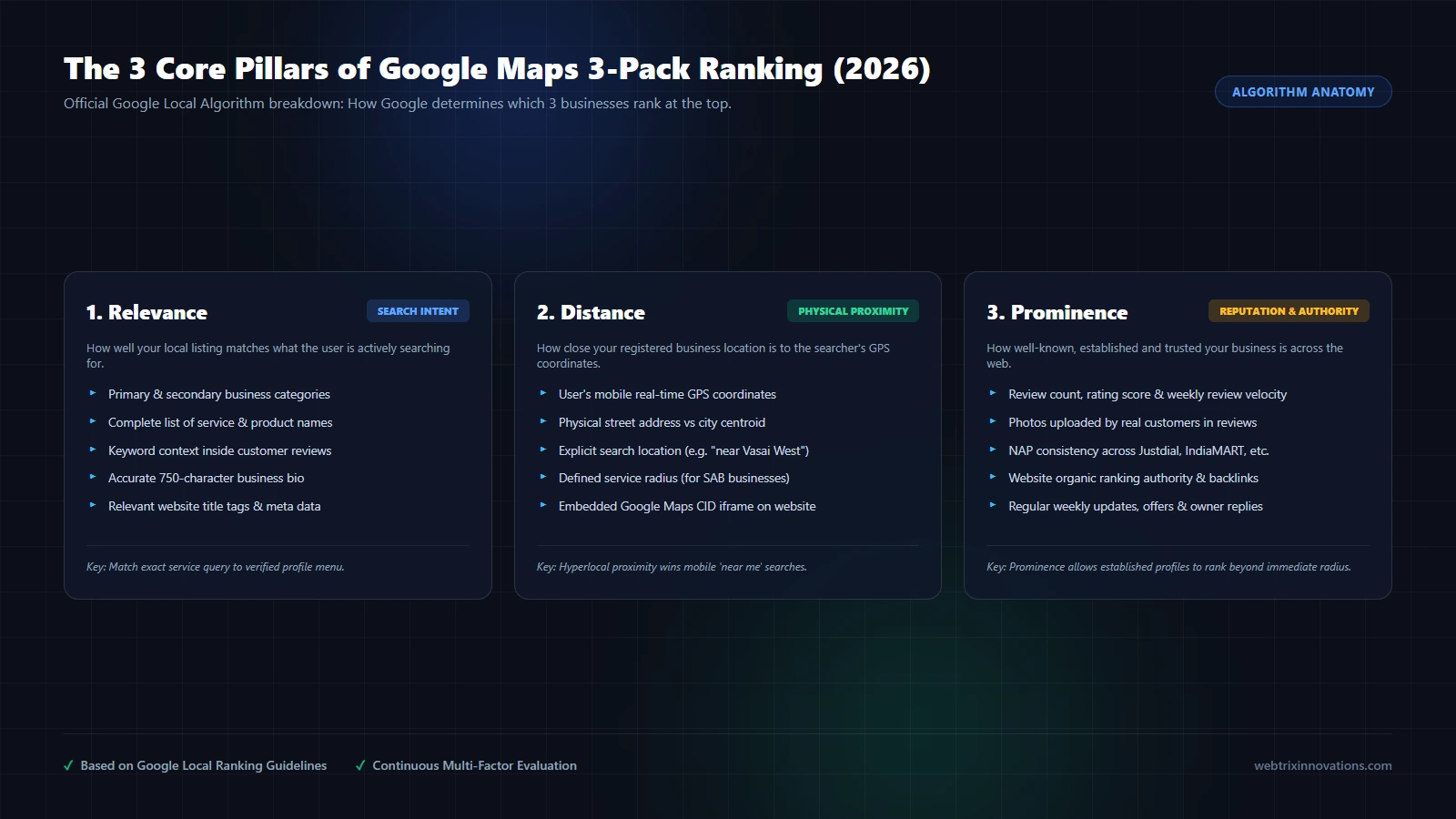
Google officially evaluates local search rankings based on three primary pillars:
| Algorithmic Pillar | What Google Measures | Actionable Optimization Strategy |
|---|---|---|
| 1. Relevance | How well your local listing matches the intent of the search query. | Select the ideal primary category, flesh out 100% of services, answer user FAQs in Google Q&A, and mention specific services in customer review prompts. |
| 2. Distance | How far the business is located from the searcher's physical GPS location. | Ensure exact pin coordinates, specify detailed local delivery areas, and create localized city/neighborhood landing pages on your linked website. |
| 3. Prominence | How well-known, authoritative, and trusted your business is across the digital ecosystem. | Maintain continuous review velocity, build citations on high-authority directories (Justdial, IndiaMART), earn local news coverage, and build website domain backlinks. |
The Review Strategy That Boosts Map Rankings (Without Penalties)
Customer reviews are the single most powerful driver of the Prominence pillar in local SEO. However, review quality in 2026 matters just as much as review quantity.
What Makes a Review Boost Your Ranking?
- Keywords in Reviews: When a satisfied client writes, “Webtrix Innovations built an outstanding custom Laravel e-commerce website for our brand in Mumbai,” Google’s natural language processing associates your listing with those exact high-ticket keywords.
- Reviews with Photos: Google prioritizes reviews where customers attach real photos of your store, team, or completed deliverables.
- Review Velocity: Earning 3 to 5 genuine reviews every month consistently signals an active, thriving business. Getting 50 reviews in one weekend followed by silence triggers fraud review filters.
- Owner Responses: Respond to 100% of reviews (both positive and negative) within 24 to 48 hours. Express gratitude, mention the specific project completed, and maintain professional diplomacy.
⚠️ Warning Against Buying Fake Google Reviews:
Never purchase fake 5-star review packages from telemarketing agencies or WhatsApp groups. Google has deployed advanced AI bot detection that tracks IP clustering, reviewer account age, and GPS location history. Profiles caught buying reviews face immediate review purging, ranking demotion, or permanent account suspension.
Local Citations and NAP Consistency in India
A citation is any mention of your business’s Name, Address, and Phone number (NAP) on an external website.
Google crawls third-party business directories to corroborate the data on your Google Maps profile. If your address is written one way on Google, a different way on your website, and a third way on Justdial, Google’s confidence score drops, hurting your 3-Pack rank.
Top Local Citation Platforms in India:
- IndiaMART (Essential for B2B, industrial, manufacturing, and IT services)
- Justdial (High domestic crawl frequency for local consumer inquiries)
- Sulekha (Service-oriented local business directory)
- TradeIndia (B2B supplier and manufacturer verification)
- Facebook Business Page & Instagram Professional Account
- LinkedIn Company Page
- Bing Places for Business (Powers Microsoft Edge and Copilot search)
- Apple Maps Connect (Powers Siri and Apple Maps on iPhones in India)
Ensure that your company legal name, street address, PIN code, and contact number are 100% identical across all platforms.
Connecting Your Website to Google Maps (Schema & CID Embedding)
Your Google Business Profile and your official website work as a synchronized dual-engine for local SEO dominance. An authoritative website elevates your Maps listing, while an active Maps profile drives qualified organic traffic to your website.
1. Embed Your Official Google Maps CID Iframe
Embed an interactive Google Maps iframe of your verified listing directly into the footer or Contact page of your website. This provides Google’s web crawlers with direct cryptographic proof of your physical geolocation.
2. Implement Schema.org LocalBusiness Structured Data
Inject semantic JSON-LD structured data into your website codebase. Here is the exact production standard implemented across Webtrix Innovations:
{
  "@context": "https://schema.org",
  "@type": "ProfessionalService",
  "@id": "https://webtrixinnovations.com/#organization",
  "name": "Webtrix Innovations",
  "url": "https://webtrixinnovations.com",
  "telephone": "+919209167989",
  "email": "agency@webtrixinnovations.com",
  "priceRange": "₹₹",
  "address": {
    "@type": "PostalAddress",
    "streetAddress": "Shop No. 19-20, Silver Arcade Building, Vani Aali",
    "addressLocality": "Vasai West",
    "addressRegion": "Maharashtra",
    "postalCode": "401201",
    "addressCountry": "IN"
  },
  "geo": {
    "@type": "GeoCoordinates",
    "latitude": 19.3812,
    "longitude": 72.8258
  },
  "hasMap": "https://maps.google.com/?cid=YOUR_CID_NUMBER",
  "openingHoursSpecification": {
    "@type": "OpeningHoursSpecification",
    "dayOfWeek": ["Monday", "Tuesday", "Wednesday", "Thursday", "Friday", "Saturday"],
    "opens": "09:30",
    "closes": "19:00"
  }
}
By connecting your Schema data to your verified Maps listing, Google connects your organic search authority with your Local 3-Pack pin.
How Google Maps Powers AI Search Recommendations (ChatGPT & Gemini)
In 2026, local discovery is rapidly shifting toward generative AI search platforms such as Google Gemini, ChatGPT Search, and Perplexity.
When an executive in Mumbai asks ChatGPT: “Which web development agency in Mumbai MMR can build a high-performance custom Laravel web application with in-person meetings?”, where does the AI retrieve that data?
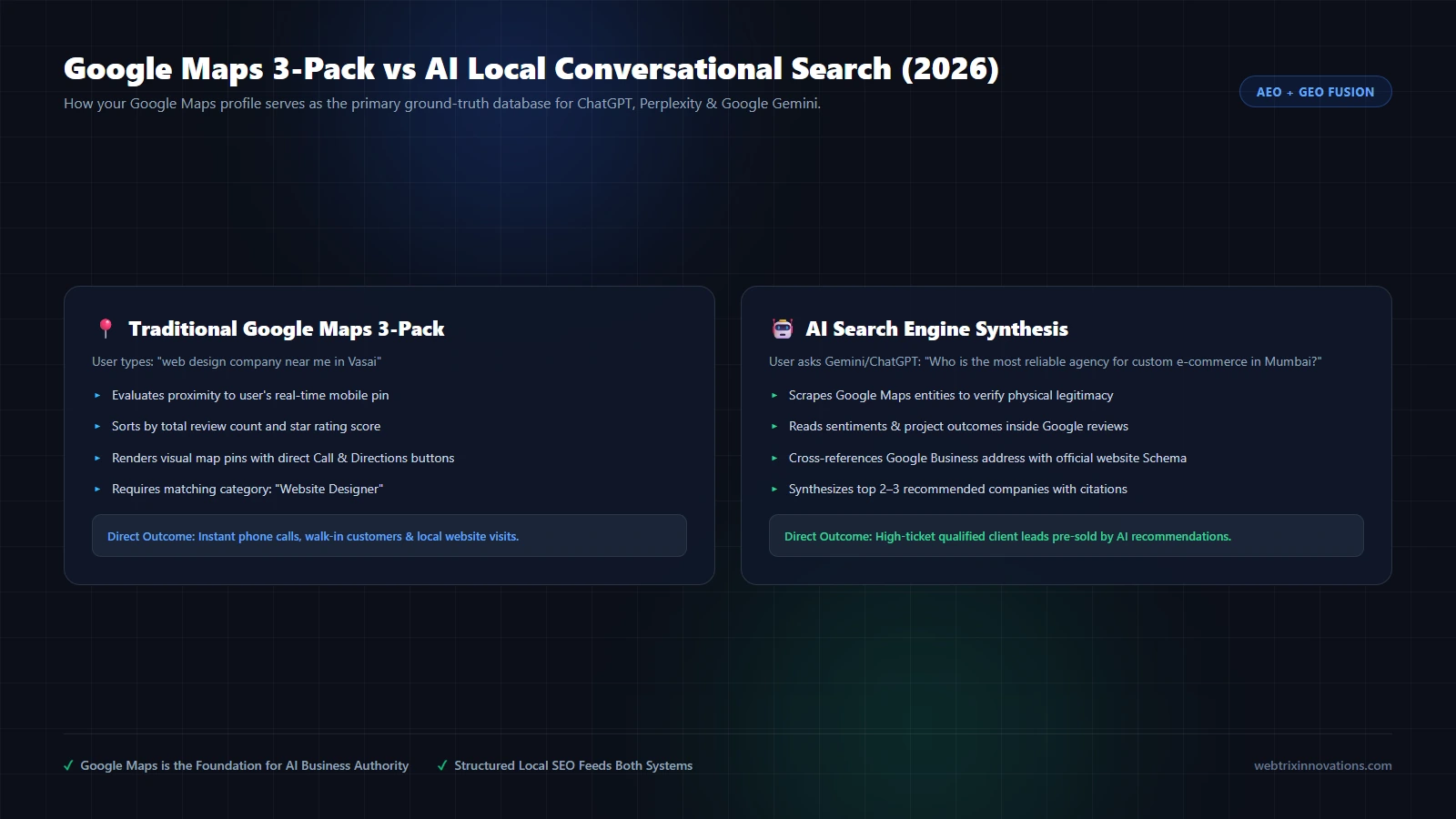
AI search engines do not rely on unverified social media claims. They reference verified ground-truth databases, and Google Maps is the world’s most verified business entity directory.
- Physical Verification Confirms Legitimacy: AI engines prioritize verified physical entities over faceless website domains to prevent hallucinating scam operations.
- Review Sentiment Mining: AI bots read customer review text to extract genuine project outcomes, client satisfaction, and specialized technical capabilities.
- Entity Matching: When your Google Business Profile, website Schema, and external citations match seamlessly, AI models confidently cite and recommend your business in conversational summaries.
Fatal Mistakes That Trigger Instant Profile Suspension
Google’s automated anti-spam algorithms suspend thousands of Indian business profiles every week. Avoid these fatal missteps:
- Keyword Stuffing Business Titles: Adding taglines or locations to your official registered name (e.g. “Webtrix Innovations - Best Web Development Agency in Vasai Mumbai”) triggers automated hard suspensions.
- Virtual Offices & Coworking Desks: Claiming a virtual mailbox or coworking flexi-desk where you do not have permanent physical signage or dedicated private staff is strictly prohibited.
- Changing Critical Details Repeatedly: Altering your business name, primary category, or physical address multiple times in a short window triggers an automated security re-verification freeze.
- Multiple Listings at the Same Address: Creating two different listings for related sister companies at the exact same physical room number without distinct separate legal entities and distinct exterior signboards.
- Using Toll-Free or VoIP Numbers as Primary: Google prefers verifiable local landlines or mobile numbers registered in the business owner’s state.
Local Case Study: Webtrix Innovations (Vasai & Mumbai MMR)
As a technology and web engineering agency, Webtrix Innovations operates its verified headquarters at Shop No. 19-20, Silver Arcade Building, Vani Aali, Vasai West, Palghar - 401201.
By implementing the exact local SEO blueprint outlined in this guide—combining a verified physical storefront profile, 100% complete service menus, authentic client review collection, sub-second website Core Web Vitals, and localized Schema.org data—our agency consistently captures high-intent client inquiries across Vasai, Virar, Nalasopara, Mira-Bhayandar, Thane, and Mumbai without spending lakhs on paid Google Ads.
Local business owners in the Mumbai Metropolitan Region who desire face-to-face discovery sessions and transparent technical development appreciate having a verified local office to visit, creating trust that anonymous remote freelancers cannot replicate.
Frequently Asked Questions About Google Maps Registration
How to register a business on Google Maps in 2026?
To register a business on Google Maps, log in to google.com/business with your business Google account, enter your exact legal company name, select your primary category, and specify your physical address or service radius. Complete the mandatory mobile video verification by recording your street, permanent signboard, door unlocking, and official business documents (GST or Udyam). Once verified within 24 to 72 hours, optimize your hours, photos, and services to start ranking in the Local 3-Pack.
Is Google Maps registration free in India?
Yes, Google Business Profile is 100% free. Google does not charge any setup fee, subscription fee, or monthly maintenance cost for creating or maintaining a verified Google Maps listing. Be cautious of telemarketing scams claiming to represent Google demanding annual renewal fees.
Why does Google require video verification in India?
Google replaced postcard verification in India with video verification to eliminate spam listings, fake lead-generation brokers, and virtual mailbox operations. Video verification provides conclusive photographic proof that your business physically exists, has permanent street signage, and that you possess authorized access to the operational premises.
Can I register a business on Google Maps without a physical shop or office?
Yes. If you operate a home-based business, mobile service (such as plumbing, repair, photography, or consulting), you can register as a Service Area Business (SAB). You provide your residential address for private verification by Google, but choose the setting to hide your street address from public searchers, displaying only your designated service territory.
How long does it take for a business to appear on Google Maps after verification?
Once your video verification is reviewed and marked approved, your profile typically becomes publicly visible on Google Maps within a few hours to 3 days. However, ranking in the competitive Local 3-Pack for popular search keywords generally takes 4 to 12 weeks of sustained optimization, review collection, and citation building.
Can I add city names or keywords to my business name on Google Maps?
No. Adding descriptive keywords or city locations that are not part of your legally registered business name violates Google’s terms of service and triggers automated profile suspension. Keep your name strictly identical to your storefront signage and tax documentation.
The 15-Point Google Maps Launch and Ranking Checklist
Master Local SEO & Google Maps Checklist
- ☑ 1. Dedicated company Google account created
- ☑ 2. Exact legal business name entered (no keyword stuffing)
- ☑ 3. Most specific primary category selected
- ☑ 4. Up to 9 secondary categories mapped
- ☑ 5. Storefront vs Service Area Business (SAB) designated correctly
- ☑ 6. Map pin manually centered on building entrance
- ☑ 7. Continuous uncut video verification recorded and approved
- ☑ 8. 750-character business description populated with semantic terms
- ☑ 9. Regular and holiday operating hours published
- ☑ 10. Services and Products menu fully priced and described
- ☑ 11. 20+ original, high-resolution geo-tagged photos uploaded
- ☑ 12. 100% NAP consistency verified across Justdial, IndiaMART, and social profiles
- ☑ 13. Schema.org LocalBusiness JSON-LD markup deployed on website
- ☑ 14. Google Maps CID iframe embedded on website Contact page
- ☑ 15. Review acquisition workflow established for regular client feedback
Need expert guidance on establishing dominant local search visibility for your business? Explore our comprehensive Local SEO Optimization Services, calculate customized project investment with our interactive Project Estimator, or contact our engineering team directly for a free local visibility consultation.
Need help implementing this in your business?
Explore our professional development and design capabilities.
About Webtrix Innovations
Webtrix Innovations designs and develops modern websites, web applications, e-commerce stores, and digital marketing strategies for growing businesses.